

Using WordPress categories the right way can make a significant difference in how visitors navigate your site and how search engines understand your content. This guide walks you through practical steps for setting up WordPress categories effectively, ensuring your blog stays organized, readable, and SEO-friendly. With clear examples, actionable tips, and proven best practices, you will be able to build a category structure that works across all your posts.
What are WordPress categories?
WordPress categories are broad labels that group your posts into major topic areas. Unlike tags, which highlight specific details within a post, WordPress categories define the main subject of your content. Think of them as the chapters of a book — they give your entire site a clear, logical structure that both visitors and search engines can follow.

Every post should belong to at least one of your WordPress categories. The platform assigns an “Uncategorized” label by default, which is a clear signal that categories are required, not optional. Renaming or removing that default should be one of the first things you do when setting up a new site.
| Feature | WordPress categories | Tags |
|---|---|---|
| Purpose | Group posts by broad topic | Describe specific post details |
| Scope | Wide — covers the overall subject | Narrow — specific features or topics |
| Required per post? | Yes — every post needs one | Optional |
| Ideal count per site | 5–10 categories | 5–8 tags per post |

Why proper WordPress categories matter
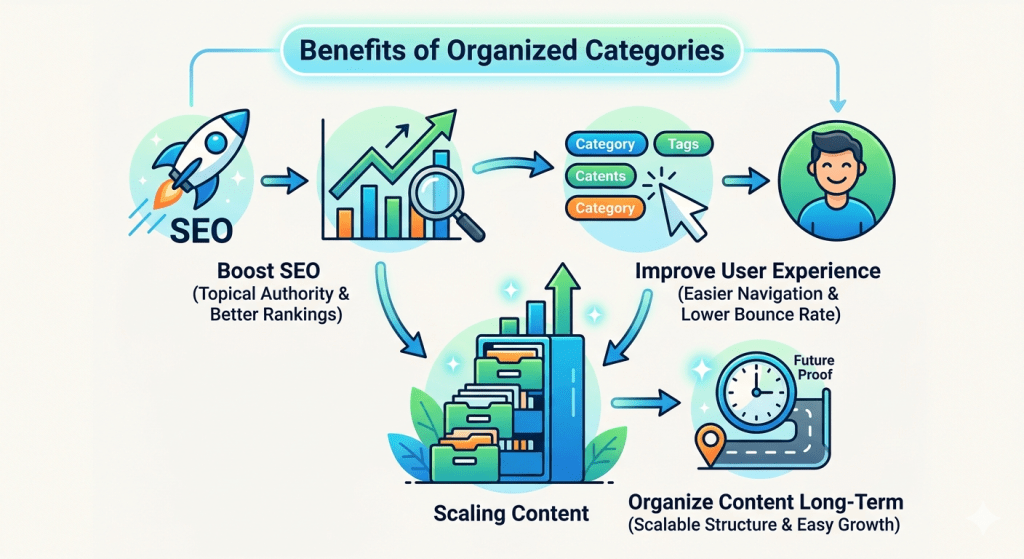
Well-structured WordPress categories deliver three clear benefits for your site:
1. Boost SEO
Search engines use WordPress category archive pages to understand your site’s topic structure. A focused category with multiple related posts signals topical authority and helps your site rank for broader keywords.
2. Improve user experience
Visitors can click a category to explore all related posts without endless scrolling. Clear WordPress categories keep readers on your site longer and reduce bounce rate.
3. Organize content long-term
A solid category structure scales with your blog. Starting with the right WordPress categories means you will never need to reorganize hundreds of posts later on.
Common WordPress category mistakes to avoid
Before getting into best practices, here are the four mistakes that trip up most sites when setting up WordPress categories:
- ❌ Too many categories — Having 20+ WordPress categories on a small blog spreads your content thin and confuses both visitors and search engines. Stick to 5–10 focused categories.
- ❌ Vague or generic names — Category names like “Other,” “Misc,” or “General” provide no real value. Every category name should immediately tell a visitor what they will find inside.
- ❌ Too many categories per post — Adding 5–6 categories to a single post dilutes its relevance signal. One primary category per post — two at most — is the right approach.
- ❌ Duplicating categories as tags — categories and tags should work together, not repeat each other. Tags go deeper, covering specific topics within the broader category subject.
Avoiding these four keeps your WordPress categories clean, navigable, and well-organized for search engines.
How to use WordPress categories effectively
1. Plan your categories before publishing
Your WordPress categories should reflect the main topics your blog will cover long-term — not just what you are writing today. Spend time mapping out your core subjects before creating a single category. A little planning upfront saves a lot of restructuring later.
✅ Good category names
- WooCommerce Tips
- Speed Optimization
- SEO & Marketing
- Plugin Reviews
- Theme Customization
❌ Avoid these
- Stuff
- WordPress (too broad)
- Blog Posts
- Miscellaneous
- Uncategorized
2. Keep your total WordPress categories between 5 and 10
For most blogs, five to ten WordPress categories is the sweet spot. Fewer categories mean each one accumulates more posts, creating stronger topical clusters that search engines reward. If you find yourself creating an eleventh category, ask — can this topic fit under an existing one instead?
3. Assign one primary category per post
Each post needs a clear home within your WordPress categories. Assign one primary category, and a second only when it genuinely applies to the content. Sticking to one primary category ensures your post’s relevance signal stays focused and your archive pages remain useful for readers and search engines alike.
✅ Good practice
- One primary category per post
- A second category only when both truly apply
- Rename or delete “Uncategorized” right away
❌ Avoid this
- Assigning 4–6 categories to one post
- Using categories as a substitute for tags
- Leaving posts in “Uncategorized” as a fallback
4. Keep WordPress category names short — 2 to 3 words
Concise category names are easier to display in navigation menus, easier for visitors to scan, and more useful in URLs. Two to three words is the sweet spot for naming your WordPress categories.
✅ Good
- Plugin Reviews
- Speed Optimization
- SEO & Marketing
❌ Avoid
- WordPress Plugin Reviews and Comparisons
- Tips for Optimizing Your WordPress Speed
- SEO, Marketing, and Growth Strategies
5. Use SEO-friendly slugs for your WordPress categories
Your category slug appears directly in your post URLs. Keep it short, lowercase, and keyword-rich. A clean slug makes your categories more useful in both search results and shared links.
| Category name | Good slug | Avoid |
|---|---|---|
| WooCommerce Tips | /woocommerce-tips/ | /category/woocommerce-tips-and-guides/ |
| SEO & Marketing | /seo-marketing/ | /category/seo-and-marketing-blog-posts/ |
| Plugin Reviews | /plugin-reviews/ | /category/wordpress-plugin-reviews-2024/ |
6. Don’t duplicate tag names as WordPress categories
Categories should cover broad subjects. Tags should go deeper into the specifics. If a label is too narrow to cover more than a handful of posts, it belongs as a tag — not as one of your WordPress categories.
✅ Good
- Category: SEO & Marketing
- Tags: keyword research · content marketing · conversion optimization
❌ Avoid
- Category: Keyword Research
- Tag: keyword research ← same label, adds nothing
7. Only create a category if you can fill it
A WordPress category with only one or two posts creates a thin archive page with little value for visitors or search engines. Before adding a new category, confirm you have at least five posts planned for it.
Rule of thumb: If you cannot name at least five posts that belong in a category, do not create it yet. Merge it into an existing WordPress category and revisit later when you have enough content to support it.
Quick reference checklist
Before you finalize any of your WordPress categories, run through this checklist:
- ✓ Is it broad enough? WordPress categories should cover a wide topic area, not a single post angle.
- ✓ Is the name clear? A first-time visitor should immediately understand what this category covers.
- ✓ Is it 2–3 words? Short names work better in menus, URLs, and navigation.
- ✓ Can you fill it with 5+ posts? Every WordPress category needs enough content to make its archive page genuinely useful.
- ✓ Is it different from your tags? If it sounds too specific, it belongs as a tag — not a category.
- ✓ Does it already exist? Check whether a similar WordPress category is already there before creating a near-duplicate.
Yes to all six → add it. No to any → skip it or rethink it.
Example: smart WordPress categories in practice
Here is how well-structured categories look across three different posts on a WordPress-focused blog. Each category is broad, clear, and reusable across many posts — that is the standard to aim for.
“Improve WooCommerce checkout speed”
| Category | WooCommerce Tips |
| Tags | checkout optimization · payment gateway · page speed |
| URL | /woocommerce-tips/improve-checkout-speed/ |
“Best caching plugins for WordPress”
| Category | Plugin Reviews |
| Tags | caching · wp rocket · w3 total cache |
| URL | /plugin-reviews/best-caching-plugins/ |
“How to do keyword research for a WordPress blog”
| Category | SEO & Marketing |
| Tags | keyword research · content strategy · long-tail keywords |
| URL | /seo-marketing/keyword-research-wordpress/ |

Wrapping up
Mastering WordPress categories is not just about SEO — it is about creating a smoother, more enjoyable experience for your readers. Well-planned categories make your content easier to discover, your site easier to navigate, and your search rankings stronger over time.
Follow this WordPress Categories Guide and your content will be organized, searchable, and easy to navigate for both visitors and search engines alike. Start today by auditing your existing categories, renaming any vague ones, and making sure no post is sitting in “Uncategorized.”


Leave a Reply