
Google Rankings Drop After a Website Redesign more often than many businesses realize. You invest time, money, and effort into creating a modern website with better design, faster performance, and improved user experience. Everything looks ready for growth. Then the new site goes live—and within days, organic traffic starts slipping, keyword rankings fall, and leads begin to slow down.
This happens because a redesign changes more than visuals. It can affect URLs, page speed, internal links, metadata, mobile usability, and the SEO signals Google already trusted on your old site. Even small mistakes during launch can cause serious ranking loss.
However, this problem is usually preventable. With the right planning, technical checks, and SEO strategy, you can redesign your website without sacrificing visibility.
In this guide, you’ll learn why rankings drop after redesigns, the hidden mistakes that cause traffic loss, and the exact steps to protect or recover your search performance. If you want a better website that also supports growth, this is where the strategy begins.
Table of Contents
- Why Google Rankings Drop After a Website Redesign
- 10 Hidden Reasons Rankings Drop After Redesign
- How to Prevent Ranking Loss Before Launch
- Launch Day SEO Checklist
- What to Do If Rankings Already Dropped
- The WPExtent Safe Redesign Framework
- DIY vs Hiring Experts
- Final Thoughts
- FAQ
Why Website Redesign SEO Impact Leads to Ranking Drops
To understand the risk, you need to understand what Google actually trusts. Over time, your website builds a set of signals that tell Google: this content is relevant, this page is authoritative, this site is technically sound. Those signals include your URL structure, your page content, your internal links, your backlinks, your metadata, and your technical performance.
A redesign, by nature, touches all of these. Even small structural changes can confuse Google’s crawlers. Large overhauls — new URLs, rewritten content, altered navigation — can wipe out years of built-up trust in a matter of weeks.
The problem is not the redesign itself. Modern, fast, well-designed websites rank very well. The problem is how the transition is handled. Most ranking losses after a redesign are the direct result of technical mistakes made during the migration, not the visual or structural improvements themselves.
Google needs time to recrawl and reassess your site. If the signals it finds are broken, inconsistent, or degraded compared to what existed before, your rankings will reflect that. Until Google re-establishes trust in your updated site, expect some volatility — and if the transition was poorly handled, expect something worse than volatility.
10 Hidden Reasons Website Redesigns Cause Ranking Loss
Let us go deeper. These are the ten most common technical and content-level issues that cause ranking loss — and what to do about each one.
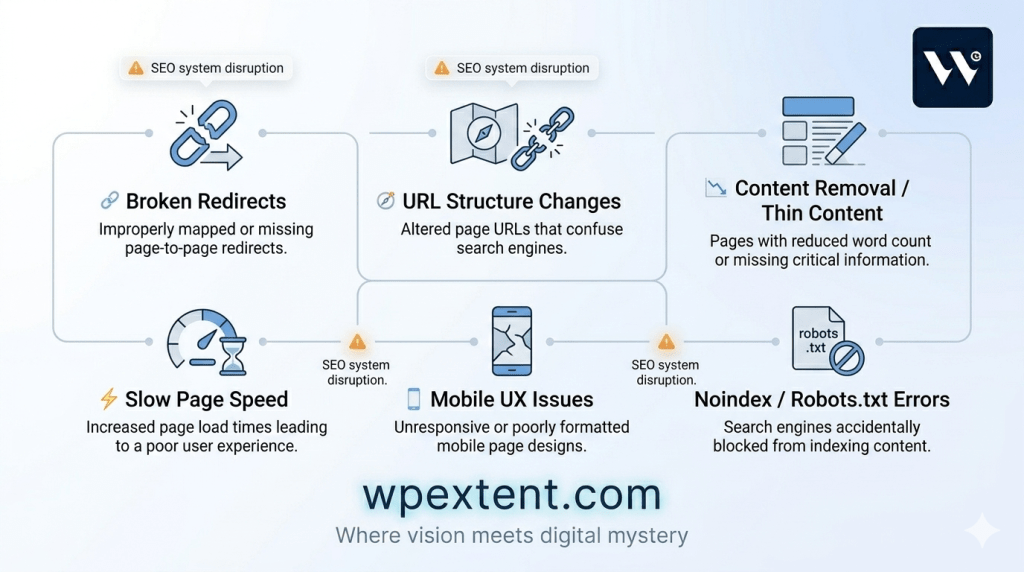
Broken or Missing Redirects
The Issue: When URLs change during a redesign — even slightly — every old URL that once had rankings, backlinks, or traffic becomes dead weight if it is not properly redirected.
The Impact: Google loses the page entirely. All the authority that page carried disappears. Users get 404 errors. Crawlers move on.
The Fix: Before launch, map every existing URL to its new destination and implement 301 redirects. No exceptions. Use a tool like Screaming Frog to crawl the old site and build a complete redirect map.
URL Structure Changes
The Issue: Restructuring your site architecture — reorganizing categories, changing folder structures, cleaning up slugs — creates a new URL for almost every page.
The Impact: Google has indexed your old URLs. Backlinks point to them. Social shares reference them. Changing them without proper redirects severs every one of those connections.
The Fix: Whenever possible, keep URLs identical to the previous version. If changes are necessary, implement clean 301 redirects and allow several weeks for Google to process the chain.
Lost Title Tags and Meta Descriptions
The Issue: It is surprisingly common for metadata to simply disappear during a CMS migration or theme switch. SEO plugins get deactivated, fields get cleared, or the new theme overwrites existing tags.
The Impact: Google relies heavily on title tags to understand page relevance. Missing or generic titles reduce click-through rates and keyword signal strength significantly.
The Fix: Before the redesign, export every page’s title tag and meta description. After launch, audit every page to confirm the metadata survived the transition intact.
Thin or Rewritten Content
The Issue: Redesigns often come with content refreshes. Writers trim long pages for a cleaner feel. Developers replace text with images. Entire sections get cut in the name of simplicity.
The Impact: Google ranked the original content. Removing it or significantly thinning it removes the very signals that earned the ranking in the first place.
The Fix: Identify your highest-ranking pages before the redesign using Google Search Console. Treat the content on those pages as protected. Any changes to ranking content should be incremental and strategic, never wholesale deletions.
Slower Page Speed
The Issue: New themes, heavier design elements, unoptimized images, additional scripts, and animation libraries can all increase load time dramatically.
The Impact: Core Web Vitals are a confirmed Google ranking factor. A redesign that increases load time will directly hurt rankings, especially on mobile.
The Fix: Run PageSpeed Insights on your new design before launch. Optimize images, minimize scripts, use a caching layer, and select a lightweight theme. Speed is not cosmetic — it is a ranking signal.
Mobile UX Problems
The Issue: Google indexes the mobile version of your site first. A redesign that looks beautiful on desktop but renders poorly on mobile is a serious problem.
The Impact: Poor mobile experience affects Cumulative Layout Shift, Interaction to Next Paint, and overall usability scores — all of which influence rankings.
The Fix: Test every page on real mobile devices, not just browser simulators. Use Google’s Mobile-Friendly Test. Fix tap targets, font sizes, overflow issues, and any interactive elements that break on smaller screens.
Noindex or Robots.txt Mistakes
The Issue: Developers routinely block search engines during the staging phase of a redesign. The problem comes when the noindex tag or robots.txt rule is not removed before the site goes live.
The Impact: Google stops indexing your site entirely. Rankings disappear almost immediately once the crawler realizes the site has signaled it should not be crawled.
The Fix: This is one of the most critical checks on launch day. Confirm there is no noindex meta tag and that robots.txt does not contain a Disallow: / rule. Both are easy to miss and devastating when overlooked.
Broken Internal Linking
The Issue: Internal links distribute PageRank across your site. A redesign that removes pages, changes URLs, or restructures navigation can break hundreds of internal links silently.
The Impact: Orphaned pages lose their ranking support. Deep pages that were previously accessible become invisible to crawlers. Authority stops flowing through your site structure.
The Fix: After launch, crawl your site with a tool like Screaming Frog or Ahrefs. Identify all 404 errors in internal links and correct them. Rebuild your internal linking structure to support your highest-value pages.
Missing Schema Markup
The Issue: Structured data — schema markup for articles, products, FAQs, local business, breadcrumbs — is often lost when switching themes or rebuilding templates.
The Impact: Rich results disappear. Click-through rates from search results drop. Google has less structured context to understand your pages.
The Fix: Audit your schema markup before and after the redesign. Use Google’s Rich Results Test to verify that all key schema types are functioning correctly on live pages.
Crawl and Index Confusion
The Issue: A major redesign presents a dramatically changed site to Googlebot. New page structure, new internal link patterns, and new content all require a full recrawl — which takes time and can create gaps in coverage.
The Impact: Until Google has fully recrawled and re-indexed your site, you may see index fluctuations, ranking volatility, and pages temporarily dropped from results.
The Fix: Submit an updated XML sitemap to Google Search Console immediately after launch. Monitor crawl coverage regularly. Use the URL Inspection tool to request indexing on critical pages that are slow to reappear.
How to Prevent Website Redesign SEO Impact Before Launch
The best time to protect your SEO is before the redesign begins. Most ranking losses are not inevitable — they are the result of skipping steps that seem tedious until you see the traffic decline.
Start With a Full SEO Audit
Before a single pixel changes, document what is currently working. Identify your highest-traffic pages, your top-ranking keywords, your most-linked URLs, and your current technical health. This baseline becomes your protection list — the things you must preserve no matter what the new design demands.
Crawl and Export Everything
Use Screaming Frog or a similar crawler to export every URL, title tag, meta description, H1, canonical tag, and internal link on your existing site. This export is your safety net. If anything goes wrong during the redesign, you have a complete record to restore from.
Build a Redirect Map Before You Build Anything Else
If any URLs are going to change — and in most redesigns, at least some will — map old URLs to new destinations before the development work begins. A redirect map is a simple spreadsheet that prevents the most damaging SEO issue in any website migration.
Protect Your Highest-Value Pages
Pages that currently generate traffic, leads, or backlinks are not candidates for experimentation during a redesign. Keep their URLs identical. Keep their core content intact. You can improve them — but do not strip them.
Maintain Topical Authority and Content Depth
If your site has built authority in a particular subject area, the redesigned site must reinforce that authority. Do not remove topic clusters, delete supporting blog posts, or consolidate pages in ways that reduce content depth. Google ranks sites that demonstrate consistent, deep expertise.
Optimize Speed From the Start
Design for performance, not just aesthetics. Choose a lightweight theme. Compress images at upload. Defer non-essential scripts. A site that launches fast is far easier to maintain than one that requires emergency performance work post-launch.
Test Thoroughly on Mobile
Every template, every page type, every interactive element should be tested on mobile before launch. Mobile-first indexing means Google sees your mobile experience first. Anything that breaks there affects your rankings.
Back Up Metadata and Analytics Configuration
Export all metadata. Confirm that analytics tracking codes survive the migration. Verify that Google Search Console is verified and connected. These are the measurement systems you will rely on to monitor post-launch performance.
Website Redesign SEO Impact Launch Day Checklist
On the day you push your redesign live, run through this checklist before announcing it to the world.
- Remove all noindex tags from every live page
- Confirm robots.txt allows crawling — no Disallow: / rules
- Test all major redirects — old URLs should forward correctly to new destinations
- Submit the updated XML sitemap to Google Search Console
- Verify Google Analytics is tracking sessions correctly
- Confirm Search Console is verified and property settings are correct
- Test Core Web Vitals with PageSpeed Insights on key pages
- Check mobile responsiveness on multiple real devices
- Verify all internal links on the homepage and top navigation
- Confirm schema markup is active on critical page types
- Test the site crawlability using the URL Inspection tool in Search Console
- Verify canonical tags are pointing to the correct URLs
- Check that all forms, tracking pixels, and conversion goals are firing
How to Recover From Website Redesign SEO Impact (If Rankings Already Dropped)
If you are reading this after the launch and the traffic decline has already started, stay calm. Panicking leads to reactive changes that compound the problem. What you need is a systematic recovery process.

Step 1: Diagnose Before You Fix
Open Google Search Console and look at the Performance report. Identify which queries and pages lost the most impressions and clicks. Look at the Coverage report for spikes in 404 errors or excluded pages. This data tells you where the damage is concentrated.
Step 2: Audit Your Indexing Status
Use the URL Inspection tool to check whether key pages are indexed. Look for pages that were previously indexed but are now excluded, noindexed, or returning errors. This is often the fastest clue to what went wrong.
Step 3: Fix Redirect Chains and Errors
If redirect issues exist, fix them immediately. Every day a redirect is missing is another day Google loses the authority signal from that page. Prioritize redirects for your highest-traffic and most-linked URLs first.
Step 4: Restore Lost or Thinned Content
If pages that previously ranked have been significantly altered or removed, restore them. Bring back the content depth that earned the ranking. Do not simply copy back old content blindly — improve it — but ensure the topical relevance and depth are at least as strong as before.
Step 5: Recover Missing Metadata
Audit every key page for title tags and meta descriptions. Restore any that were wiped out during the migration. Use your pre-redesign export as the source. Title tags are among the strongest on-page signals Google uses.
Step 6: Improve Site Speed
If your redesign made the site slower, address it immediately. Image compression, plugin cleanup, and caching improvements can often be implemented within 24 to 48 hours without design changes.
Step 7: Rebuild Internal Linking
Crawl the live site and fix every internal 404 error. Re-establish the internal linking structure that supports your most important pages. Think of internal links as pathways that guide both users and crawlers to your key content.
What to Expect During Recovery
Once the technical fixes are in place, give Google time to recrawl and reassess. For minor issues, recovery can take two to six weeks. For major migrations where redirects were missing or content was significantly changed, recovery timelines of three to six months are realistic. Monitor Search Console weekly and resist the urge to make additional structural changes while recovery is in progress.
WPExtent Safe Website Redesign SEO Framework
At WPExtent, we have developed a structured approach to website redesigns that protects organic traffic at every phase. Rather than treating SEO as an afterthought, we build it into the redesign process from the first meeting to the final monitoring report.
Phase 1 — Audit
Every WPExtent redesign engagement begins with a comprehensive SEO audit of the existing site. We document current rankings, top-performing content, backlink profiles, technical health scores, and site architecture. Nothing moves forward until we have a complete picture of what needs to be protected.
Phase 2 — Mapping
Before development begins, we build a complete URL map, a redirect plan, a content inventory, and a structural blueprint. This mapping phase ensures that every SEO asset is accounted for before the first line of new code is written.
Phase 3 — Protection
During development, we apply what we call SEO protection rules to all high-value pages. URLs are preserved wherever possible. Core content is maintained. Metadata is backed up and built into the new templates from day one.
Phase 4 — Optimization
The redesign is also an opportunity to improve. We optimize page speed, improve schema implementation, strengthen internal linking, and ensure the new design meets or exceeds the technical performance of the previous site. A redesign should leave the site in a stronger position, not an equivalent one.
Phase 5 — Launch Control
Our launch process follows a structured checklist that covers every technical checkpoint before, during, and immediately after go-live. We do not simply push the button and hope for the best. Every redirect is tested. Every indexed page is verified. Analytics and Search Console are confirmed before the client is notified of the launch.
Phase 6 — Growth Monitoring
The week after launch is just as important as launch day itself. We monitor ranking movements, crawl coverage, Core Web Vitals, and traffic trends closely. Any anomalies are addressed within 24 hours. Over the following months, we track recovery curves and growth trajectories to ensure the redesign delivers on its promise.
DIY vs Expert Help in Website Redesign SEO Impact Cases
For personal projects or low-stakes websites, a DIY redesign is entirely reasonable. But there is a threshold where the risk of getting it wrong outweighs the savings of doing it yourself.
If your website currently generates a meaningful portion of your revenue through organic search, a poorly executed redesign is not just a technical inconvenience — it is a business continuity risk. Losing 40% of your organic traffic for six months is not an abstract SEO problem. It is lost sales, lost leads, and lost momentum that can take a year to recover.
The businesses that tend to suffer the worst SEO damage after redesigns are the ones who hired general web developers without SEO expertise, or who managed the project internally without a migration checklist. The technical work looks correct on the surface. The site functions. But the SEO layer — the redirects, the metadata, the content preservation, the crawl configuration — was handled without the knowledge to do it right.
If your site does more than $5,000 a month in revenue influenced by organic traffic, the cost of professional SEO oversight during a redesign is almost always smaller than the cost of recovering from a mismanaged one. WPExtent works with business owners and agencies to make redesigns safe, strategic, and growth-focused — not just aesthetically improved.
Final Thoughts on Website Redesign SEO Impact
A website redesign is one of the most significant investments a business makes in its digital presence. It is also one of the most common sources of avoidable SEO damage. The businesses that come out of redesigns stronger are not the ones with the biggest budgets or the most creative agencies. They are the ones who treated SEO as a core part of the process, not a cleanup task for after launch.
Google rankings drop after a website redesign when the signals Google trusts are broken, ignored, or not carried forward properly. Every one of those signals can be protected with the right process. And if the damage is already done, most of it can be recovered with patience, precision, and the right technical approach.
Whether you are planning a redesign or navigating the aftermath of one, the path forward is the same: understand what went wrong, fix the foundations, and give Google the time it needs to rebuild its trust in your site. The rankings will follow.
Frequently Asked Questions About Google Rankings Drop After a Website Redesign
Will rankings always drop after a Google Rankings Drop After a Website Redesign?
Not necessarily. Rankings can remain stable or even improve after a well-planned Google Rankings Drop After a Website Redesign strategy is executed properly. The key is treating SEO as an integral part of the process rather than a post-launch consideration. Businesses that audit their site, preserve high-value pages, implement proper redirects, and maintain technical standards often avoid any meaningful ranking loss.
How long does SEO recovery take after a Google Rankings Drop After a Website Redesign?
It depends on the extent of the issue. Minor technical problems after a Google Rankings Drop After a Website Redesign—such as broken redirects or missing metadata—can recover in two to six weeks once fixed. Larger migration issues involving URL changes or content loss may take three to six months for full recovery. The faster issues are identified, the quicker recovery begins.
Can a WordPress redesign hurt rankings in a Google Rankings Drop After a Website Redesign situation?
Yes, absolutely. A Google Rankings Drop After a Website Redesign is common in WordPress projects if SEO is ignored. Theme changes can remove metadata, break schema markup, reduce speed, and alter URL structures. However, with proper planning, these risks can be fully controlled.
Should I change URLs during a Google Rankings Drop After a Website Redesign?
Only if there is a strong strategic reason. In most Google Rankings Drop After a Website Redesign cases, changing URLs unnecessarily increases risk. If changes are unavoidable, always implement 301 redirects and allow time for Google to reprocess the site structure.
How do I redesign my website without losing traffic during a Google Rankings Drop After a Website Redesign?
The key is preparation. Audit your site, preserve high-performing pages, build a redirect map, test everything before launch, and monitor performance after go-live. Every skipped step increases the risk of a Google Rankings Drop After a Website Redesign impacting your traffic.
Why did my traffic drop after a Google Rankings Drop After a Website Redesign?
The most common reasons include broken redirects, removed content, lost metadata, slower page speed, or indexing issues. In many Google Rankings Drop After a Website Redesign cases, Google Search Console will clearly show the root cause within days of review.
Can rankings come back after a Google Rankings Drop After a Website Redesign?
Yes. In most cases, recovery is possible after a Google Rankings Drop After a Website Redesign if the technical and SEO issues are fixed quickly. Once Google recrawls the corrected site, rankings typically return gradually depending on severity and response time.
Work With WPExtent
Planning a redesign? WPExtent helps businesses modernize their websites without sacrificing the organic rankings and traffic they have worked hard to build. Our process is built to protect what matters while delivering a site that performs better in every direction.
Lost traffic after a recent launch? WPExtent can diagnose what went wrong, prioritize the fixes that matter most, and guide your site back to — and beyond — its previous performance.
Growth happens when redesign decisions are backed by strategy, not just aesthetics. If you are ready to approach your next project the right way, WPExtent is ready to help.
Follow WPExtent for More Insights
Get practical WooCommerce tips, conversion strategies, and real-world insights to grow your online business.
We Are Available On:
Instagram:
https://www.instagram.com/thewpextent
Twitter (X):
https://x.com/TheWPExtent
Reddit:
https://www.reddit.com/user/WPExtent/



Leave a Reply