

WordPress websites attract thousands of spam comments, fake form submissions, and malicious messages every single day. Whether you run a blog, business website, WooCommerce store, or portfolio site, spam can quickly become a serious problem.
That is where Akismet comes in.
Akismet is one of the most trusted anti-spam plugins for WordPress. Developed by Automattic, the company behind WordPress.com, Akismet helps website owners automatically block spam comments and unwanted submissions before they ever appear on a website.
In this guide, we will explore everything you need to know about the Akismet WordPress plugin, including its features, benefits, pricing, setup process, pros and cons, and why millions of WordPress users trust it for spam protection.
What Is Akismet?
Akismet is a cloud-based spam filtering plugin designed specifically for WordPress websites. It automatically checks comments, contact form submissions, reviews, and user-generated content against a massive global spam database.
If the plugin detects suspicious activity or spam-like behaviour, it blocks the content before it reaches your website.
For example, when several websites start reporting similar-looking content as spam, then Akismet will learn to identify that kind of content as spam in the future.
The plugin comes pre-installed with many WordPress installations and has over 6 million active installations worldwide. (wordpress.com)
Why Spam Is a Serious Problem for WordPress Websites
Many website owners underestimate the impact of spam until their site becomes overwhelmed with fake comments and harmful submissions.
Spam can:
- Damage your website credibility
- Slow down website performance
- Create security risks
- Fill your database with useless content
- Harm user experience
- Increase moderation workload
- Affect SEO performance indirectly
- Spread malicious links and phishing attempts
Without proper spam protection, WordPress websites can receive hundreds or even thousands of spam submissions every day.
This is why using a reliable WordPress anti-spam plugin like Akismet is extremely important.
Key Features of the Akismet WordPress Plugin
Akismet offers a wide range of powerful spam protection features for WordPress websites.
1. Automatic Spam Filtering
Akismet automatically scans all comments and form submissions to identify spam content before publication.
This removes the need for manual moderation and saves a huge amount of time.
2. AI-Powered Spam Detection
The plugin uses machine learning and AI-based filtering technology to improve spam detection accuracy continuously.
Because Akismet analyses spam data from millions of websites globally, it constantly becomes smarter at detecting suspicious behaviour.
3. Contact Form Spam Protection
Akismet works with many popular WordPress contact form plugins, including:
- Contact Form 7
- Gravity Forms
- Jetpack Forms
- Formidable Forms
- WooCommerce reviews
This helps protect websites from fake enquiries and bot submissions.
4. Comment Status History
Akismet stores the status history of each comment so administrators can easily see:
- Which comments were flagged as spam
- Which comments were approved
- Which moderator actions were taken
5. Automatic Discard Feature
The plugin can automatically discard the worst spam submissions to reduce database clutter and improve website performance.
6. Global Spam Database
Akismet compares submissions against a massive cloud-based spam database that is updated continuously.
This allows the plugin to detect new spam techniques quickly.
7. Seamless Integration
Akismet integrates directly into the WordPress dashboard, making it beginner-friendly and easy to manage.
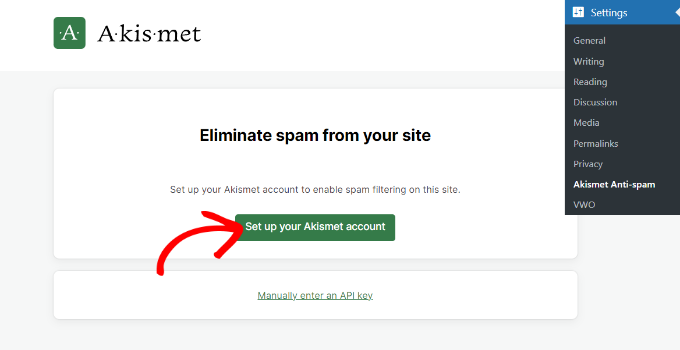
Upon activation, you can navigate to Settings » Akismet Anti-Spam from your WordPress dashboard. Next, go ahead and click the ‘Set up your Akismet account’ button.
Now, a new tab or window will open in your browser, and you’ll see the Akismet pricing page. Akismet offers free and premium pricing plans.
If your site is not for commercial purposes, like it doesn’t run ads, then you can choose the Personal plan. Otherwise, you’ll need to select one of the commercial plans.
For the sake of this tutorial, we will be using the Personal plan.
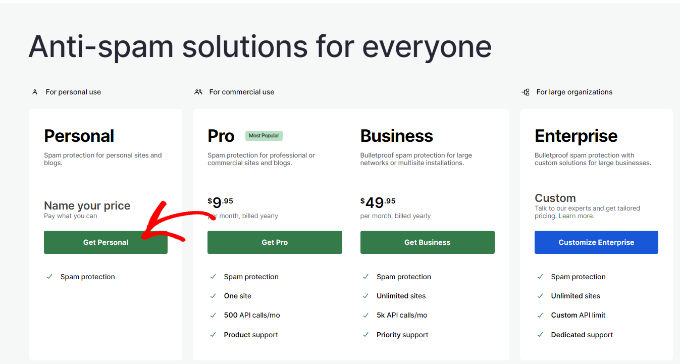
By default, the price will be set to $36 per year. However, you can move the pricing slider under ‘What is Akismet worth to you’ to any price from 0 to $120 per year.
Aside from that, Akismet will also ask you to check the boxes to say you are not running ads, selling products and services, or promoting a business on your site.

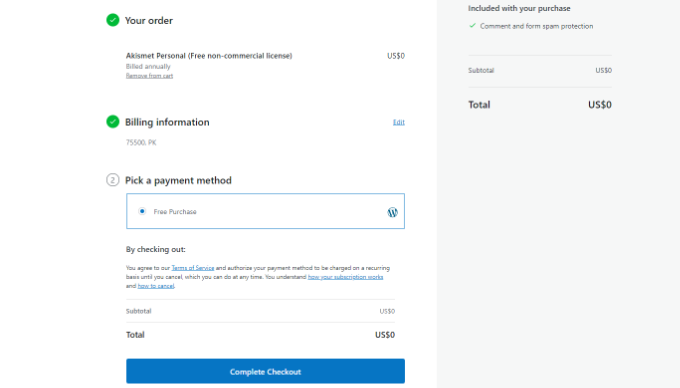
On the next screen, you’ll need to complete the checkout process along with choosing a price you want to pay for your account.
Once that’s done, simply click the ‘Complete Checkout’ button.
Next, you’ll see the Akismet API key that you’ll need to enter on your website.
Go ahead and copy the key.

To complete the configuration, you can head back to your site’s WordPress dashboard and navigate to the Settings » Akismet Anti-Spam page.
Now go ahead and click the ‘Manually enter an API key’ button.

When you click the button, a new field will appear where you’ll need to enter the API key.
Once the API key is connected, Akismet will start protecting your website from spam comments.
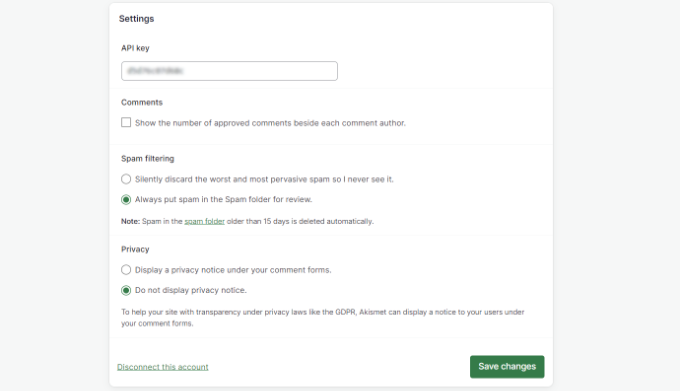
You can also tweak the settings in Akismet. For instance, the plugin lets you display the number of approved comments beside each comment author, review spam comments, or automatically discard them and show a privacy notice under comment forms.
When you’ve made the changes, go ahead and click the ‘Save Changes’ button.
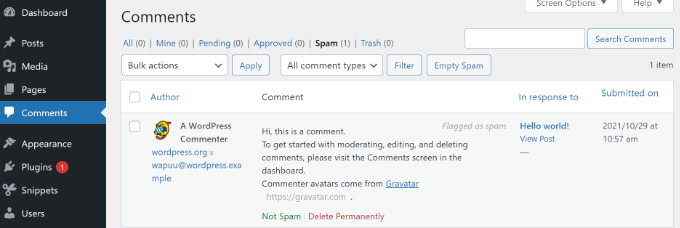
Next, you can review spam comments by navigating to Comments from your WordPress dashboard and then selecting the ‘Spam’ tab.
If you feel that a legitimate comment has been marked as spam, then you can simply click the ‘Not Spam’ button under the comment.
You can also permanently delete comments or click the ‘Empty Spam’ button to clear the spam folder.
Final Thoughts
Akismet remains one of the best WordPress anti-spam plugins available today.
Its AI-powered spam filtering, seamless WordPress integration, and user-friendly setup make it an excellent solution for beginners and professionals alike.
Instead of wasting time deleting spam comments manually, website owners can focus on growing their business and publishing quality content.
If you are looking for a reliable, trusted, and efficient spam protection plugin for WordPress, Akismet is definitely worth considering.
You can learn more or get started by visiting the official Akismet WordPress page.
Follow WPExtent for More Insights
Get practical WooCommerce tips, conversion strategies, and real-world insights to grow your online business.
We Are Available On:
Instagram:
https://www.instagram.com/thewpextent
Twitter (X):
https://x.com/TheWPExtent
Reddit:
https://www.reddit.com/user/WPExtent/


Leave a Reply