
Would you like to create custom page for your WordPress site ? Then this article is going to help you to create a unique custom page for your WordPress site. Ive divided this into two sections. One of them is to create a custom page without plugin ( recommended for techy person ) and another one is to create a custom page with plugin ( recommended for non-techy person )
Whats a custom page on a WordPress site.
You might have noticed that most of the WordPress sites have the different layout for the different page.
But WordPress doesnt have this functionality by default, youll have to make a custom page for a different layout. By default, WordPress shows a post from single.php and a page from page.php. So if you want to give a page unique layout, youll have to make one for that.
Note: You should have a basic knowledge of HTML, CSS, and PHP to create a custom page for your WordPress site.
So lets drive on it.
How to create a custom page without a plugin.
First of all, make a .php file in your current activated Theme folder, you can name it whatever you want. Lets name it custom-template.php . open your file using a code editor and add a comment.
<?php */ Template Name: my custom page */ ?>
You may copy this comment and also you can change the name to whatever you want.
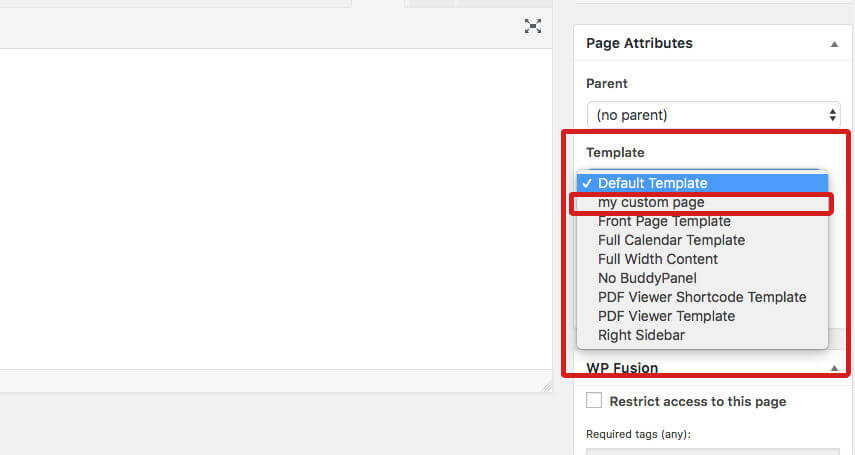
If you write the comment properly then you should have an option called Template and your template name will be listed there. ( Youll see this option when youll create a new page at the right sidebar of your admin panel )
To get a default structure of your current activated Theme, you can copy page.php file into your custom page and you can edit the code accordance with your need.

How to create a custom page with plugin.
To create a custom page with a plugin its very easy. Youll just need to download WP Page Template and activate it.
And WP Page Template plugin has two version, they have a premium version too. So you can buy it if you love their features.
If you activate the plugin then youll see an option will come at the right sidebar ( youll see that if I add a new page ) from there you can choose your layout and use it.



Leave a Reply