

Sometimes it is really needed to add body class to your WordPress site. But we can do this normally because WordPress generates its default classes by a function called body_class() . So in this article, youll learn how to add a custom body class by php.
How to add body class into WordPress normally without any condition.
If you would like to add a custom body class then you would need to use a hook called body_class . Its a filter hook. So just follow the code below :
function themePrefex_add_custom_body_class($default_classes){
$default_classes[] = webextent-custom-class;
return $default_classes // this will return all of the default class we have
}
add_filter( body_class, themePrefex_add_custom_body_class );
Note : Check your body tag body_class() function has been called or not, if not, then please add this function to your body tag, <body body_class() > .
You can copy the code and paste into functions.php file of your Theme.
Every class is stored as an array, so we have added also a class as a new array.
Now if you inspect the element and look at the body tag, youll see a class called webextent-custom-class has been added.

How to add a body class for a specific page.
To add a custom body class in your WP site, youll just need to know the ID of the page.
If you dont know how to collect the ID then look at the picture below, how I did it.

And then youll need to follow the code below we will use the same hook :
function themePrefex_add_class_conditionally( $default_classes ) {
// replace your page ID with 19
If ( is_page( 19 ) ) {
$default_classes[] = class-for-specific-page;
}
return $default_classes; // will return all of default class
}
add_filter( body_class, themePrefex_add_class_conditionally)
How to add a body class for a specific category.
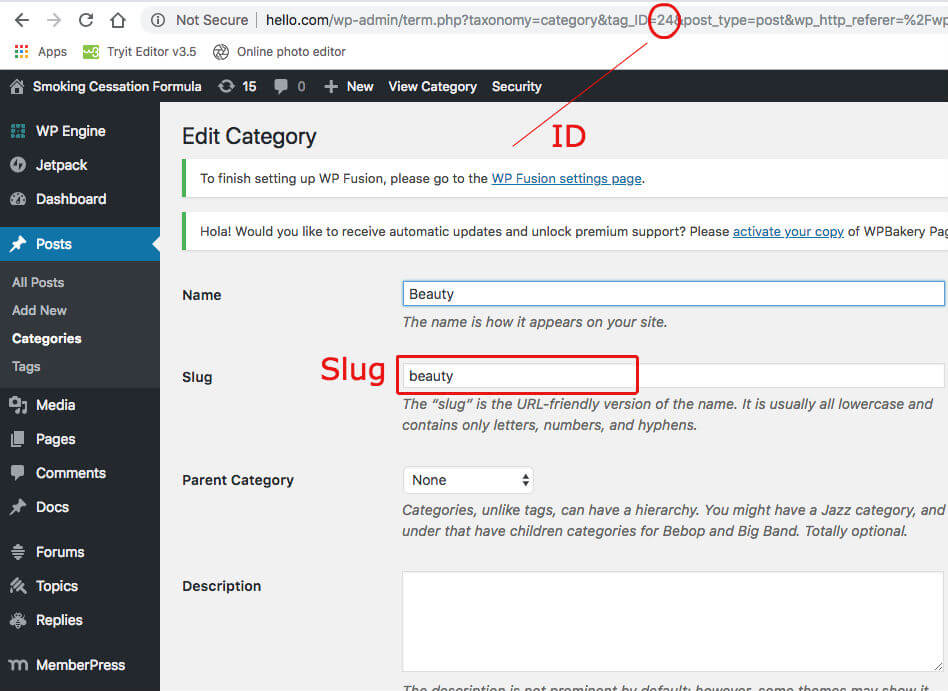
To add a class for a specific category, youll need to have an ID of the category, or slug, if you dont know how to collect an ID of a category then you can look at the picture below how I did it.
function themePrefex_add_class_for_sp_cat( $default_classes) {
if ( is_cat(9) ) {
$default_classes[] = class-for-sp-cat;
}
return $default_classes; // return all default classes
}
add_filter( body_class, themePrefex_add_class_for_sp_cat);
You can follow this step for a specific tag too. For that, youll need to use a function called is_tag(slug or ID)
How to add a class for a specific post.
To add a class in a specific post, youll have to find the post ID. For that, A screenshot has been attached below how to find it.

And then follow the instruction below:
function themePrefex_cls_sp_post( $classes ) {
// lets check it
if ( is_single( 122 ) ) {
$classes[] = class-for-122;
return $classes // return default classes
}
}
add_filter( body_class, themePrefex_cls_for_sp_post);
You can follow this for any custom post type too 🙂




Leave a Reply