

You’ve been putting in the effort — publishing content, improving your design, and installing plugins to optimize your site — yet something still doesn’t feel right. Traffic remains flat, conversions are low, and your rankings barely move. In most cases, the issue isn’t lack of effort. It’s lack of direction. A proper WordPress Website Audit is what separates guessing from strategic action.
Without a structured WordPress Website Audit, you’re essentially navigating your site without a clear map. You might fix one visible issue while missing several hidden problems that continue to hold your website back. As a result, growth feels inconsistent and unpredictable.
That’s exactly why this guide exists. The goal is simple: to give you a clear, repeatable system to evaluate your website from top to bottom, identify what’s actually holding it back, and understand what needs to be fixed first.
Let’s break it down step by step.
What Is a WordPress Website Audit System?
A WordPress website audit is a structured, full-system evaluation of everything that affects your site’s visibility, performance, and growth. It’s not a one-click SEO report. It’s not a speed test. And it’s certainly not a quick glance at your Google Analytics.
Think of it this way: an audit is to your website what a full health checkup is to your body. You’re not just checking one thing — you’re looking at the entire system to understand how each part affects the whole.
An audit isn’t a checklist you run through once. It’s a diagnostic system that reveals the hidden connections between your technical issues, SEO gaps, and growth barriers.
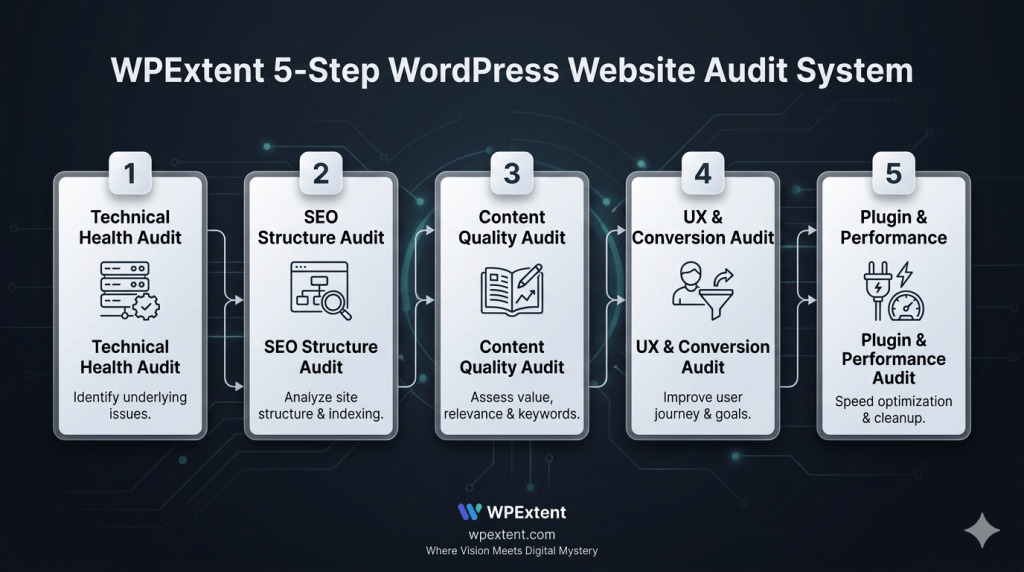
A thorough WordPress website audit covers five core layers:
- Technical infrastructure (crawling, indexing, speed, security)
- SEO structure (keyword targeting, meta data, URL setup)
- Content quality (depth, relevance, internal linking, topical authority)
- User experience and conversion paths
- Plugin ecosystem and performance overhead
When you evaluate all five together, you don’t just find problems — you find the root causes.

Signs You Need a WordPress Website Audit Today
Not every problem announces itself. In fact, many of the most damaging WordPress issues are invisible to the naked eye. However, there are consistent warning signs that tell you it’s time to run a WordPress website audit:
- Organic traffic is flat or declining with no obvious reason
- Key pages aren’t appearing in search results — even for your brand name
- Your site loads slowly on mobile or desktop
- Visitors land on your pages and leave almost immediately
- You publish regularly but see little to no growth in rankings or traffic
- You’ve added many plugins over time and performance feels sluggish
- Conversions are low despite decent traffic
- You haven’t done any kind of structured review in over six months
If two or more of these sound familiar, a WordPress website audit isn’t optional — it’s overdue.
The WPExtent 5-Step WordPress Website Audit System
Most people approach auditing by checking things randomly. They test page speed today, review some keywords tomorrow, and check their plugins next week. As a result, they miss how those issues connect — and they fix symptoms instead of causes.
The WPExtent 5-Step Audit System is built differently. Each step is designed to feed into the next, so you build a complete picture — not a scattered list of notes.
Step 1 – Technical Health Audit
Technical health is the foundation of everything. If search engines can’t crawl your site properly, your best content won’t rank. If your pages load slowly, your visitors won’t stay. Therefore, this is always the first step in any serious WordPress website audit.
What to check:
- Indexing status — Use Google Search Console to confirm which pages are indexed and which are excluded
- Crawl errors — Identify broken links, blocked resources, and redirect chains
- Page speed — Run tests in Google PageSpeed Insights and GTmetrix for both mobile and desktop
- Mobile responsiveness — Manually test key pages across different screen sizes
- SSL and HTTPS — Confirm that all pages load securely and no mixed-content warnings appear
- Core Web Vitals — Review LCP, CLS, and FID scores in Google Search Console
Why it matters: Technical issues are often invisible to site owners but immediately visible to search engines. One misconfigured robots.txt file can block an entire section of your site from Google.
Pro Tip: Fix your Core Web Vitals before anything else. Google uses them as a direct ranking signal, and they affect both SEO and user experience simultaneously.
Step 2 – SEO Structure Audit
Once your technical foundation is solid, it’s time to evaluate how well your site is structured for search. This step of the WordPress SEO audit is where most ranking problems originate — and where the fastest wins are often found.
What to check:
- Keyword targeting — Does each page target one clear, specific keyword? Or are multiple pages competing for the same term (cannibalization)?
- Meta titles and descriptions — Are they unique, optimized, and within recommended character limits?
- Heading hierarchy — Do H1, H2, and H3 tags follow a logical, keyword-informed structure?
- URL structure — Are your URLs short, clean, and keyword-focused?
- Canonical tags — Are you correctly signaling the preferred version of duplicate or similar pages?
- Schema markup — Are you using structured data to help search engines understand your content type?
Keyword cannibalization is one of the most common and most damaging issues found in a WordPress SEO audit — and it’s almost always invisible until you look for it deliberately.
For example, if you have three blog posts all targeting ‘WordPress speed tips,’ they’re splitting your authority three ways instead of building one authoritative page. Consolidation or differentiation is the fix.
Step 3 – Content Quality Audit
Content is your website’s primary value driver. However, not all content is working for you — and some of it may actually be working against you. A proper WordPress website audit treats content as a strategic asset, not just a publishing activity.
What to check:
- Thin content — Pages under 400 words with no clear value or unique insight
- Outdated content — Articles referencing old tools, statistics, or practices that no longer apply
- Orphaned pages — Content with no internal links pointing to it (invisible to both users and search engines)
- Internal linking gaps — Related content that should be connected but isn’t
- Topical authority gaps — Entire subject areas your audience searches for that you haven’t covered
- Duplicate content — Pages that are too similar in topic or structure
Internal linking is one of the most underused SEO tools in WordPress. A well-linked site distributes authority efficiently and helps search engines understand what your most important content is.
Think of your content as a network, not a list of posts. Each piece should connect to others, supporting topical authority in your niche. Therefore, the WordPress maintenance audit for content isn’t just about quality — it’s about architecture.
Pro Tip: Before you create new content, audit what you already have. Refreshing a weak post that already has some traffic and backlinks is often faster and more impactful than writing something brand new.
Step 4 – UX & Conversion Audit
A site can rank on page one and still fail to convert. This is a UX problem — and it’s often the most overlooked part of a WordPress website audit. Good rankings bring traffic. Good UX turns that traffic into results.
What to check:
- Readability — Font size, line height, contrast, and paragraph length all affect whether people actually read your content
- Page layout — Does the visual flow guide the reader naturally toward the next step?
- CTA placement — Are your calls-to-action visible, specific, and positioned where engagement is highest?
- Navigation clarity — Can a first-time visitor find what they need within two or three clicks?
- Mobile experience — Do buttons, menus, and forms work smoothly and intuitively on small screens?
- Trust signals — Are testimonials, reviews, certifications, or security badges visible where decisions are made?
For example, moving a contact form from the footer to just below the introduction of a key service page can increase conversions significantly — without changing a word of the content.
Step 5 – Plugin & Performance Audit
Plugins are one of WordPress’s greatest strengths — and one of its most common performance liabilities. In addition, outdated or conflicting plugins are the leading cause of WordPress security vulnerabilities. This final step of the WordPress technical audit ties everything together.
What to check:
- Unused plugins — Deactivate and delete anything not actively serving a purpose
- Outdated plugins — Any plugin not updated in the past 3–6 months is a security risk
- Plugin conflicts — Some combinations break layouts, slow load times, or cause PHP errors
- Duplicate functionality — Two plugins doing the same job add unnecessary overhead
- Security vulnerabilities — Use WPScan or Wordfence to check for known exploits in installed plugins
- Database overhead — Plugins like page builders often leave behind database bloat over time
As a result, a leaner plugin setup almost always means a faster, more secure, and more stable WordPress site.
Simple Audit Scoring System
After completing all five steps, you need a simple way to prioritize what you’ve found. Otherwise, a long list of issues can feel paralyzing. Therefore, rate each area using this three-tier system:
- Good — Working as expected. No action needed right now.
- Needs Improvement — Functional but suboptimal. Schedule a fix within the next 30 days.
- Critical Issue — Actively harming performance, rankings, or security. Fix immediately.
This scoring system transforms your audit from a list of observations into a prioritized action plan. You’ll know exactly where to start and in what order to proceed — which is what separates a useful audit from a forgotten report.
DIY vs System-Based WordPress Website Audit
A DIY WordPress website audit is absolutely possible. Tools like Google Search Console, Screaming Frog, Ahrefs, GTmetrix, and Semrush are powerful and many are free. However, the limitation of DIY auditing isn’t the tools — it’s the approach.
When you audit manually without a system, you tend to:
- Check things in isolation rather than seeing how they connect
- Fix the most visible problems rather than the most impactful ones
- Miss cross-layer issues (e.g., a slow plugin that’s also a security risk and a UX problem)
- Lose track of what you’ve checked and what still needs review
In contrast, a system-based approach like the WPExtent 5-Step Audit System gives you a structured path through every layer of your site. As a result, you don’t just find more problems — you understand how they relate and what to fix first.
The difference between a DIY audit and a system-based audit isn’t the tools you use. It’s whether you can see the connections between what you find.
Why WPExtent Is the Right Audit Guide
Most audits simply tell you what’s wrong. WPExtent goes a step further — it shows you what actually matters and what will move your website forward.
There is a clear difference between receiving a long list of technical issues and having a prioritized roadmap for real growth. At WPExtent, a WordPress Website Audit is not treated as a one-time report. Instead, it becomes the starting point of a continuous improvement system that evolves with your website.
Here’s what the WPExtent audit process looks like in practice:
- Full-System Evaluation — We analyze all five core layers together: technical health, SEO structure, content quality, user experience, and plugin performance. Because in reality, no issue exists in isolation — everything is connected.
- SEO + Content + Performance Alignment — We don’t just identify problems; we connect them. We evaluate how site speed impacts rankings, how content gaps limit authority, and how user experience directly affects conversions.
- Clear Priority Roadmap — Instead of overwhelming you with hundreds of issues, we organize everything into a structured action plan: what needs immediate attention, what should be scheduled, and what should simply be monitored.
- Growth-Focused Strategy — Every recommendation is tied to a real outcome — better rankings, improved performance, stronger engagement, or higher conversions. Not just technical fixes for the sake of it.
In addition, WPExtent’s WordPress maintenance services extend the value of the audit beyond a single point in time. With continuous monitoring, performance tracking, and ongoing WordPress Website Audits, your website stays optimized as it grows — instead of slowly drifting back into the same issues.
Because ultimately, a strong website is not built in a single effort — it is maintained through a system that keeps improving over time.
Frequently Asked Questions
What is a WordPress website audit and why is it important?
A WordPress website audit is a structured, multi-layer evaluation of your site’s technical health, SEO setup, content quality, user experience, and plugin performance. The goal is to identify what’s holding your site back and build a clear, prioritized plan to fix it.
How often should I run a WordPress website audit?
At minimum, run a comprehensive WordPress website audit once or twice a year. However, if you’ve recently gone through a redesign, a major content push, or significant plugin changes, it’s worth running a targeted audit sooner. Ongoing monitoring in between audits is also strongly recommended.
What tools do I need for a WordPress audit checklist?
The most useful tools for a WordPress audit checklist include Google Search Console, Google PageSpeed Insights, Screaming Frog, GTmetrix, Ahrefs or Semrush for keyword and link analysis, and WPScan or Wordfence for security. Together, these tools cover all five layers of a complete audit.
Can I do a WordPress performance audit without a developer?
Yes — many aspects of a WordPress performance audit are accessible to non-developers. Page speed tools, Google Search Console, and most SEO plugins are designed for non-technical users. However, for deeper technical issues like server configuration, database optimization, or plugin conflicts, a developer’s input can save significant time.
Why is my WordPress site underperforming even though I publish regularly?
Publishing alone doesn’t guarantee performance. Underperformance usually stems from technical issues like slow load times or crawl errors, SEO problems like keyword cannibalization, or weak internal linking that prevents topical authority from building. A proper WordPress maintenance audit typically identifies the real cause within the first two steps.
What’s the difference between a WordPress SEO audit and a full website audit?
A WordPress SEO audit focuses on keyword targeting, meta data, and search engine visibility. A full WordPress website audit is broader — it also covers technical infrastructure, content quality, user experience, and plugin performance. A full audit almost always reveals issues that a standalone SEO audit misses.
How long does a complete WordPress website audit take?
A basic self-guided audit following a structured WordPress audit checklist typically takes four to eight hours for a medium-sized site. A thorough, system-based audit covering all five layers can take one to three days, depending on site complexity. Ongoing audits, once a system is in place, are faster.
Conclusion
Running a WordPress website audit is one of the most strategic investments you can make in your site’s future. It shifts you from reactive problem-solving to proactive, system-driven growth. And that shift changes everything.
The five-step system covered in this guide — technical health, SEO structure, content quality, UX, and plugin performance — gives you a clear, connected view of your site. Not just a list of things to fix, but an understanding of why they’re broken and what fixing them will actually achieve.
Here’s the insight that ties it all together:
Growth doesn’t come from doing more — it comes from fixing what’s holding you back.
If you want a clear, expert-guided system to identify and resolve what’s limiting your WordPress site, WPExtent can help. Whether you’re starting with a one-time audit or looking for ongoing maintenance and monitoring that keeps your site performing at its best — the right system makes the difference.
Start with the five steps above. See what you find. And if you want a second pair of expert eyes on your site, WPExtent is ready to guide you through every layer.
Follow WPExtent for More Insights
Get practical WooCommerce tips, conversion strategies, and real-world insights to grow your online business.
We Are Available On:
Instagram:
https://www.instagram.com/thewpextent
Twitter (X):
https://x.com/TheWPExtent
Reddit:
https://www.reddit.com/user/WPExtent/


[…] Check this: How to Audit Your WordPress Website (Step-by-Step System) […]
I think it’s a valuable service page: a WordPress audit can reveal hidden SEO, speed, and security issues, though the pitch likely matters as much as the checklist.