

Most websites don’t break in one dramatic moment. They fade. Quietly, gradually, almost invisibly, until a business owner suddenly realises the contact form hasn’t worked in weeks, the homepage drags on mobile, or organic traffic has been drifting downward for months without anyone catching it. That slow decline almost always traces back to a single overlooked habit: skipped website maintenance.
For something so essential to modern business, websites get treated strangely. People schedule oil changes, dental check-ups, accounting reviews, and equipment servicing without a second thought. Yet the digital storefront responsible for leads, credibility, and revenue often goes untouched for a year or more. The damage isn’t loud. It builds layer by layer until it becomes expensive, embarrassing, or both.
This guide unpacks what really happens behind the scenes when website maintenance is ignored for too long, why the consequences compound, and how a more proactive approach protects everything you’ve already built. Whether you’re running a small business site, a growing brand, or a busy WordPress installation, understanding the slow erosion is the first step toward preventing it.
Why Many Businesses Ignore Website Maintenance
The reason isn’t laziness. It’s invisibility. A website looks the same on Tuesday as it did on Monday, so the owner assumes nothing is happening behind the scenes. The dashboard isn’t flashing red. No email arrives announcing decay. The site simply exists, which is exactly the problem.
Many businesses treat their website as a finished project rather than a living system. Once it goes live, attention shifts to marketing, sales, operations, and a hundred other priorities. Maintenance feels like an unnecessary expense until something breaks, and by then, the cost of fixing it usually dwarfs the cost of preventing it.
There’s also a real knowledge gap. Owners often don’t know what website maintenance actually involves. They assume it means occasional plugin updates or running a backup once in a while. The deeper layers, like security monitoring, performance tuning, database cleanup, broken link checks, uptime tracking, and compatibility testing, rarely get attention because nobody warns them those layers exist. Out of sight, out of budget.
The Hidden Security Risks of Neglected Websites
Security is where neglect becomes dangerous fastest. Outdated plugins, themes, and core files create open doors that automated bots find within hours, not weeks. WordPress alone powers a huge share of the web, which means attackers run constant scans looking for known vulnerabilities in older versions. A site that hasn’t been updated in six months isn’t quietly waiting. It’s being probed.
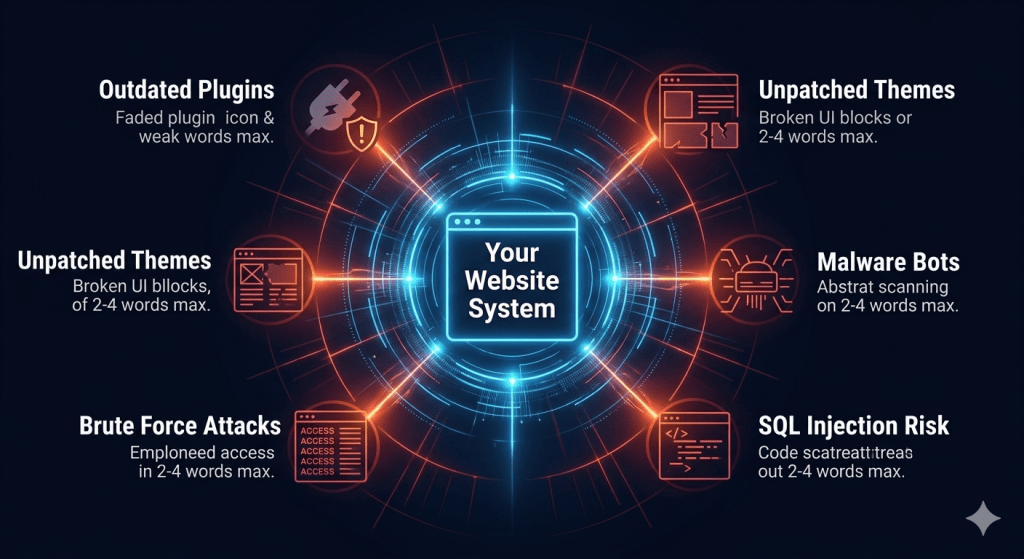
What makes this so frustrating is that most breaches don’t look like dramatic hacks. They look like injected spam links pointing to gambling or pharmaceutical sites, redirects that quietly send mobile visitors elsewhere, or hidden admin accounts created months earlier. In real-world scenarios, owners often don’t realise anything has happened until Google flags the domain or a customer mentions a strange pop-up.
Recovery is brutal. Cleaning a compromised website, restoring a clean backup, removing blacklist warnings, and rebuilding search engine trust can take weeks. The financial cost is one thing. The reputational cost, especially for service-based businesses, is harder to measure and harder to undo. Consistent website security closes those doors before anyone tries to walk through them.
How Website Performance Gradually Declines
Speed problems creep in quietly. A new image here. A heavier plugin there. An expired caching configuration. A bloated database holding years of post revisions and abandoned drafts. Individually, none of these things feel significant. Together, they turn a fast website into a sluggish one over twelve to eighteen months.
Visitors notice immediately, even if they can’t articulate why. Years of user behaviour research have made one thing clear: people abandon slow websites faster than almost any other type of digital experience. They don’t email you to complain. They simply leave and go to a competitor whose site loaded in two seconds instead of seven.
What makes this particularly damaging is that the owner usually doesn’t see the problem. They visit their own site from a cached browser on a fast office connection, and everything feels normal. Meanwhile, real users on mobile networks are bouncing in droves. Regular performance audits, image optimisation, database cleanups, and caching reviews are the unglamorous work that keeps website speed consistent year after year.

The SEO Impact of Poor Website Maintenance
Search engines reward websites that work well, and they penalise the ones that don’t. When website performance slips, Core Web Vitals scores drop, mobile usability warnings appear in Google Search Console, and rankings begin to slide for keywords that once brought consistent traffic.
The slide is rarely sudden. It’s a slow erosion that most owners only notice once a quarter or two of organic traffic has already disappeared. By then, recovering those positions is harder than holding them in the first place. Competitors who maintain their sites carefully end up benefiting from rankings the neglected site quietly handed over.
There are subtler issues too. Broken internal links accumulate. Crawl errors pile up. Schema markup breaks after theme updates. Old redirects chain together until search bots give up. None of these problems announce themselves, but each one chips away at the technical foundation that makes a site discoverable. Strong SEO performance isn’t built once and left alone. It’s preserved through ongoing website maintenance that catches small issues before search algorithms do.
User Experience Problems Most Businesses Never Notice
Owners interact with their own websites in deeply unrealistic ways. They log in directly, skip the homepage, know exactly where every link leads, and have memorised the navigation. Real visitors don’t have any of those shortcuts.
When website maintenance is ignored, the user experience quietly degrades in ways that only outside visitors see. A contact form that no longer sends notifications because of an SMTP plugin update. A booking widget that stopped syncing with the calendar. A checkout button that throws a JavaScript error on certain mobile browsers. A pop-up that won’t close on iPhones. None of these things appear on the dashboard. They appear on lost sales reports.
One common pattern we see is how long these issues run. Some businesses go months without realising their primary lead form has been silently failing. Every visitor who tried to contact them was lost. The marketing budget kept driving traffic. The website kept consuming it. A simple monthly check would have caught it on day one.
Plugin, Theme, and Compatibility Issues That Build Over Time
WordPress sites in particular live in a constantly shifting ecosystem. PHP versions change. Browsers update. WordPress core releases new versions. Plugins evolve, get sold, get abandoned, or stop being compatible with newer themes. Every one of these moving parts can introduce friction.
Skipping plugin updates feels safe in the short term because nothing breaks immediately. But the longer you wait, the bigger the leap becomes. Updating a plugin that’s two years out of date often introduces conflicts with five other plugins that have all evolved independently. What could have been routine becomes a debugging marathon.
Abandoned plugins are a separate concern entirely. If a developer stops maintaining a plugin you depend on, your site keeps relying on aging code that becomes more vulnerable and less compatible every month. Spotting these dependencies early lets you migrate calmly instead of scrambling. This is one of the quieter but most valuable parts of professional WordPress website maintenance, identifying risks before they turn into crises.
Why Small Website Problems Become Expensive Problems
Almost every expensive website project we’ve seen started as a small, ignorable issue. A backup that wasn’t tested. A staging environment that didn’t exist. A plugin update that was put off “until next week.” A security warning that looked like a false alarm.
The economics of neglect are unforgiving. Preventive website maintenance costs a predictable, manageable amount each month. Emergency recovery, especially after a hack, a server failure, or a botched update, costs many multiples of that, often with hours or days of downtime layered on top. Lost revenue during downtime usually exceeds the cleanup bill itself.
There’s also the opportunity cost. Time spent firefighting is time not spent on growth, content, campaigns, or product. A neglected website doesn’t just hurt your present. It distracts you from your future. Owners who treat maintenance as insurance rather than expense almost always come out ahead financially over any meaningful timeframe.
How Neglected Websites Affect Brand Trust and Conversions
Trust online is fragile. Visitors form an opinion within seconds, and that opinion shapes whether they fill out a form, request a quote, or buy something. A slow, glitchy, outdated, or insecure website signals the same things about the business behind it: careless, outdated, possibly unreliable.
You don’t get a second chance at that impression. A first-time visitor encountering a broken layout on mobile, an SSL warning, or a checkout error will simply leave without hesitation. There’s no email, no complaint, and no feedback — just silence. In most cases, they never return, and the marketing budget that brought them in disappears with them.
Conversion rates suffer in ways that are hard to attribute. Many businesses often notice their numbers slipping and blame ad creative, copy, or pricing when the real culprit is the website experience itself. A clean, fast, well-maintained website doesn’t just look better. It quietly converts more visitors into customers because nothing on the page is asking them to second-guess their decision.
Signs Your Website Already Needs Immediate Maintenance
Some signals are obvious. Others get rationalised away. Pay attention if any of these feel familiar.
The site has noticeably slowed compared to a year ago. WordPress, plugins, or themes show pending updates that have been ignored for months. You haven’t run a full backup in recent memory, or you don’t know whether your backups can actually be restored. Forms, popups, or checkout flows have started behaving inconsistently across devices. Search rankings have drifted downward without an obvious explanation. Google Search Console shows crawl errors, mobile usability warnings, or Core Web Vitals failures. You’ve received a security notification you didn’t fully understand.
Even one of these is reason enough to schedule a proper website audit. Several together usually means the site is operating with technical debt that’s actively costing the business money, even if nobody has noticed yet.
Why Proactive Website Maintenance Matters More Than Emergency Fixes
The difference between thriving websites and struggling ones is rarely talent, budget, or even design quality. It’s discipline. Websites that perform consistently year after year are the ones being looked after consistently, not heroically rescued every six months.
Proactive website maintenance keeps small problems small. Updates happen on a schedule, in a controlled environment, with backups in place. Performance is measured regularly so trends are caught early. Security is monitored continuously rather than reviewed after a breach. Plugin compatibility is tested before deployment, not discovered through user complaints.
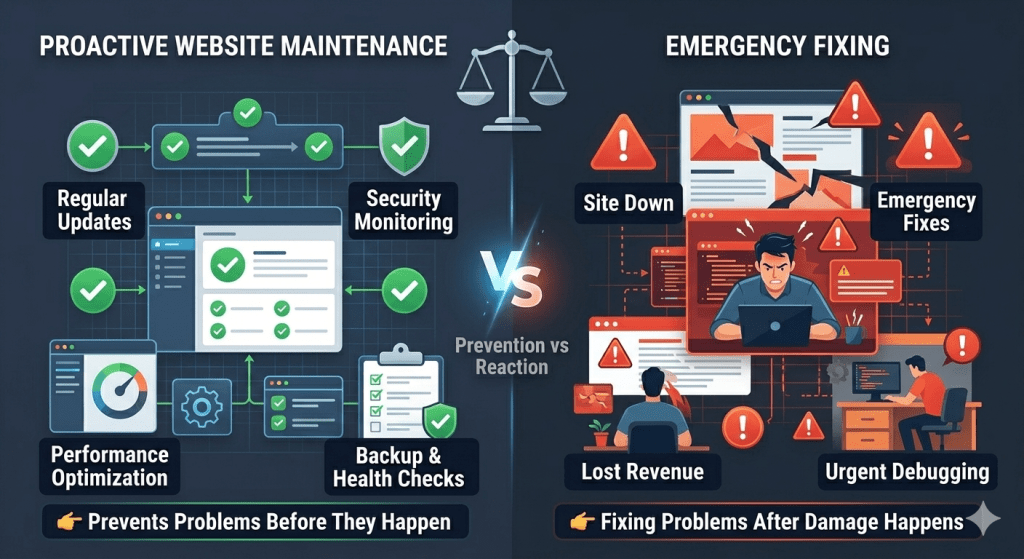
That preventive philosophy is exactly what shapes our work at WPExtent. We partner with businesses that want their websites treated as long-term assets rather than disposable projects, handling the ongoing technical care most owners don’t have the time, tools, or inclination to manage themselves. The focus is on catching the quiet issues that erode performance long before they become visible to your customers.
If you’re not entirely sure where your website currently stands, the most useful first step is usually a proper review. WPExtent offers a free website audit that examines security posture, performance metrics, SEO health, and the technical issues that tend to hide beneath the surface. It’s a low-pressure way to see what’s really happening on your site without committing to anything beyond the conversation.
Frequently Asked Questions About Website Maintenance
How often should website maintenance actually be performed?
Most business websites benefit from at least monthly maintenance, with certain tasks running weekly. Plugin and theme updates, security scans, uptime monitoring, and backup verification work best on shorter cycles. Performance audits, broken link checks, and SEO health reviews generally happen monthly or quarterly depending on how active the site is. Sites that publish frequently or process transactions usually need more attention than static brochure sites.
Is WordPress website maintenance really necessary if my site seems fine?
Yes, and this is one of the most common misconceptions. WordPress sits on top of constantly evolving software, including PHP, MySQL, your theme, and dozens of potential plugins. Even when everything looks fine on the surface, vulnerabilities, compatibility drift, and performance degradation are happening underneath. A site that “seems fine” today is often the same site that breaks unexpectedly three months from now.
What’s the real difference between website maintenance and a website redesign?
A redesign rebuilds the look, structure, or functionality of a site. Maintenance keeps the existing site healthy, secure, and performing well. Many owners assume a redesign solves their problems, but a beautifully redesigned site that isn’t maintained will degrade in exactly the same way the old one did. Maintenance is the discipline that protects whatever investment you’ve already made.
Can ignoring website maintenance really hurt my SEO that much?
It can, and the damage often compounds long before it’s noticed. Slow load times, broken links, mobile usability errors, crawl issues, expired SSL certificates, and security warnings all influence how search engines evaluate your site. Rankings rarely collapse overnight, but they drift downward steadily until recovery becomes a much bigger project than prevention would have been.
What should a proper website audit actually cover?
A meaningful website audit looks at security posture, performance and Core Web Vitals, SEO technical health, mobile experience, broken or outdated functionality, plugin and theme status, backup readiness, and any compatibility risks. It should produce clear, prioritised recommendations rather than a generic checklist. The goal isn’t to overwhelm you. It’s to show you exactly what’s healthy, what’s at risk, and what needs attention first.
How much downtime can a poorly maintained website realistically cause?
More than most owners expect. A failed update, a security incident, or an expired certificate can take a site offline for hours or days. For businesses that rely on their website for leads or sales, even short outages translate into measurable lost revenue. The cost of preventing downtime is almost always smaller than the cost of recovering from it.
Are plugin updates safe to run on my own?
Sometimes, but the risk increases the longer updates have been postponed and the more plugins are involved. Updates can occasionally introduce conflicts, break custom code, or change functionality in unexpected ways. Running them in a staging environment with a recent backup in place is the safer approach, which is why structured website maintenance processes matter more than the updates themselves.
Conclusion
Websites don’t fail loudly. They fail gradually, in ways that are easy to miss until the cost of fixing them dwarfs the cost of preventing them. Security gaps widen. Speed slips. Rankings drift. Forms stop working. Trust erodes. None of it announces itself, which is exactly why so many businesses end up dealing with consequences they could have avoided entirely.
Businesses that get this right aren’t the ones with the biggest budgets or the most complex websites. They’re the ones who treat their site as a living asset that deserves consistent care. Proactive website maintenance isn’t glamorous work, but it’s the work that protects everything else, including your marketing investment, your brand reputation, and the revenue your website is supposed to generate.
If your site has gone quiet for a while, it’s worth checking what’s actually happening beneath the surface. The earlier the small issues are caught, the smaller they stay.
Get a Free Website Audit From WPExtent
If you’d like a clearer picture of where your website currently stands, WPExtent offers a free website audit that reviews security, performance, SEO health, and the hidden technical issues most owners never see. There’s no pressure to commit to anything afterwards. It’s simply an honest, useful look at your website’s health, and a calm starting point if you decide it’s time to take maintenance seriously.
Follow WPExtent for More Insights
Get practical WooCommerce tips, conversion strategies, and real-world insights to grow your online business.
We Are Available On:
Instagram:
https://www.instagram.com/thewpextent
Twitter (X):
https://x.com/TheWPExtent
Reddit:
https://www.reddit.com/user/WPExtent/




Leave a Reply