
Nowadays, WordPress is becoming the most popular website for building simple and user-friendly Websites. WordPress is using for building various types of Websites. You can simply modify or customize your WordPress Website as you like to do that. Today, Im going to show you how to easily create an individual page for your blog post.
Why do you need to create an individual page for your blog post?
WordPress usually displays your blog post on your homepage. Im not saying that is not too good, but if you have an individual page for your blog posts it shows better than WordPresss default style. All of your blog posts will be there sequentially as a visitor or users can get all of the blog posts easily. So, Its quite cool and amazing to have an individual page for your blog posts or section.
Live Demo: How to create an individual page for your blog posts.
Lets create an individual page for your blog posts step by step, as you can understand the process easily.
Step 1: To create an individual page for your blog post, the first thing you need to have that is you have to make a custom home page. So, were going to male two different pages. To do that go to your WordPress Dashboard, click on Pages then Click on Add New. Give a title of these as BLOG and HOME page. Here, Its not necessary to have any contents of these pages.
Set a Static Page:
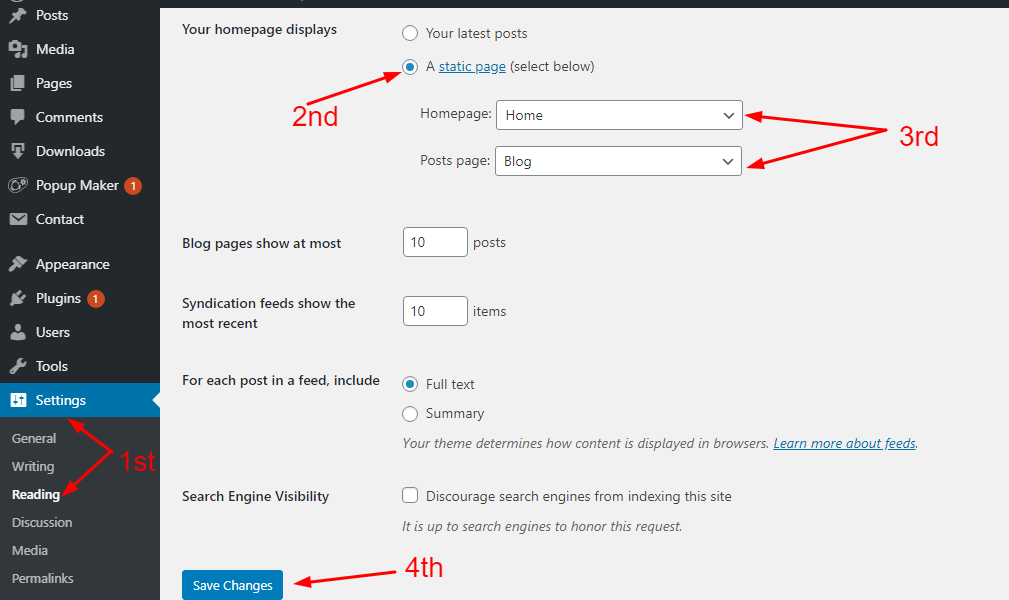
Step 2: Now go to Your WordPress dashboard again. Click on SETTINGS then select the READING option. Here you can see the Your Homepage Displays option. There you have to select A static page option. And now you can set your own static Home and Blog page. Select the newly created Home page at the HOMEPAGE area, now select the newly created Blog page at the Post Pages area. Then click on save the changes and go to your WordPress Dashboard and click on All Pages. Here youll notice that your Home and Blog pages with a new label. Now you can preview these pages.
Step 3: The outlook of these pages depends on your WordPress Themes. You can easily customize the appearance of these pages. To customize as your WordPress Themes and your preference go to your WordPress Dashboard, Click on APPEARANCE then select the CUSTOMIZE option. Here you can customize your pages as your own choice.

Step 4: To set the Blog Page link at your menubar, Go to the Appearance then click on Menus. Add the newly created Blog page at Your websites navigation menu. Now your Blog page will show at the main menu bar as your visitors can get all of the blog posts by clicking once.
WordPress provides you the facility to customize your website as you want. Thats why WordPress is getting more popular day by day.
Thats how you create an individual page for your Blog Post.
Related Post: WordPress Download Manager Plugin At a Glance.
Stay connected with the WebExtent team for more innovative and creative WordPress tricks.
Follow Us on YOUTUBE
We are available in:
Facebook: https://facebook.com/webextent.net/
Instagram: https://www.instagram.com/webextentofficial/
Twitter: https://twitter.com/WebExtent
Thanks.


Leave a Reply