

Nowadays, Divi is one of WordPress’s most popular themes. Our valued subscribers asked me how to create a custom global header in Divi.
It is one of the most requested topics that I get. So, today I will show you how to create a custom Divi header.
A small brief about the Header
When creating a website, the header is one of the essential parts we need to notice the most since it is one of the most visible and attractive parts of a website.
The header’s purpose is to introduce your branding and send a message. Headers usually appear on every page of your website, though they can vary in placement if required.
Create a Custom Global Header In Divi
The Divi Theme Builder allows building Global Header templates that can be applied anywhere on your site, including the Divi header.
We can create an attractive header for a website without dealing with CSS or HTML. Instead, we can use its visual editor.
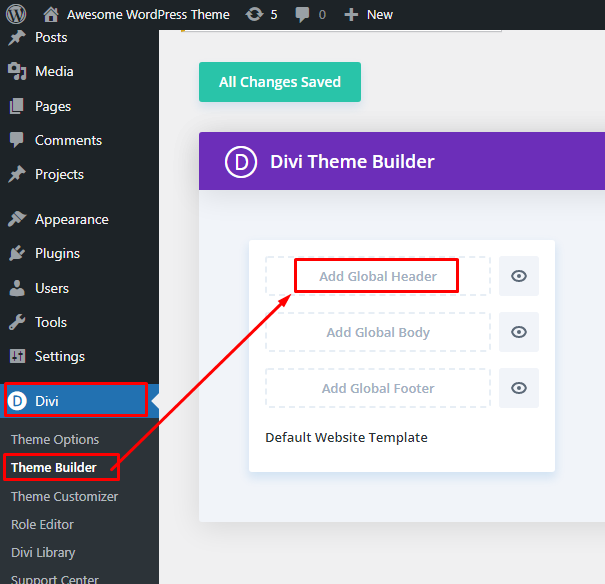
This article will share how to build a Custom Global Header in Divi using the Theme Builder. So to create a custom global header in Divi, I suggest you go to the WordPress Dashboard, click Divi, and then either click Theme Builder to build your Custom Header with Divi Builder.
Step 1: Setup Primary Menu
At first, you have to create a Primary Menu by going to Dashborad> Appearance> Menus. After creating a menu, click on the Save button to save it.

Step 2: Create a Global Header
After creating a primary menu, we have to move on to Add Global Header by going to Divi > Theme Builder and clicking on Add Global Header.
Step 3: Add & Build Global Header
Now it’s time to add the global header. By clicking on the Add Global Header, you will notice two options with a blue hover background to build a header. Then click on the first one, Build Global Header. A few seconds later, you will be able to create a Custom Global Header by clicking the + sign where we can use sections, Row, Columns, etc.

Step 4: Section Settings And Add Modules
Divi provides a section for building a Custom Global Header where we can adjust sizing, spacing, border, box-shadow, visibility, background color, text color, hover effect, etc. You can easily style your custom global header on your own choices.
If, in case, you need a menu, then don’t worry. Divi has an excellent Menu Module to use Menu anywhere. You can simply add the Menu Module and customize the Logo and Menu as you need. Please take a look at the screenshot below:
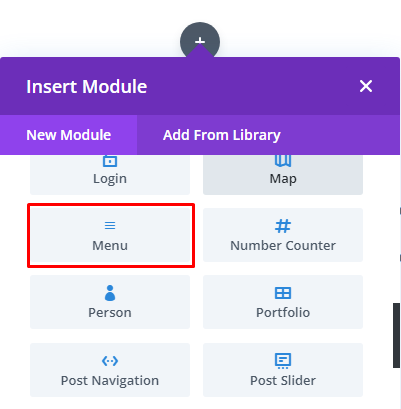
Ahh! Its done! Congratulations! Youve done a fantastic job. This is how you can easily create a custom global header in Divi.
Conclusion
Divi comes with a bundle of flavors and features for making a premium website by their theme builder. You can choose any of their modules to make your website more attractive and eye-catchy without coding headaches.
I tried to show you how to create a custom global header in Divi in this blog. I hope you enjoyed the blog.
Please comment if you face any problems while creating a custom global header. Ill reach you to solve your issue. Till then, take care and enjoy a happy ride with team WebExtent.
Suggested Blog: How to change Primary Navigation and Fixed Navigation Background Color in DIVI
Regards.




Leave a Reply