

An attractive Menu Background Color is the most important for looking at a website much better and more eye-catching. Divi has a unique option where we can add a custom background color how we want without using custom code. It is a straightforward and crazy trick. Let’s change the primary navigation and Navigation background color in DIVI.
Divi is one of the most flexible and popular themes where we can adjust the background color of the Primary and Fixed Navigation Bar. In this blog, Ill show you how to change primary navigation and Navigation background color in DIVI.
Change Primary Navigation
Primary navigation is the main navigation interface on a website. It links to the most important website pages and appears prominently at the top of the homepage and other pages. Primary navigation helps users to quickly find what they’re most likely to want, with minimal searching and clicks.
To create primary navigation on your website, I suggest you go to Dashboard > Appearance > Customize.
Please look at the direction and screenshot below:
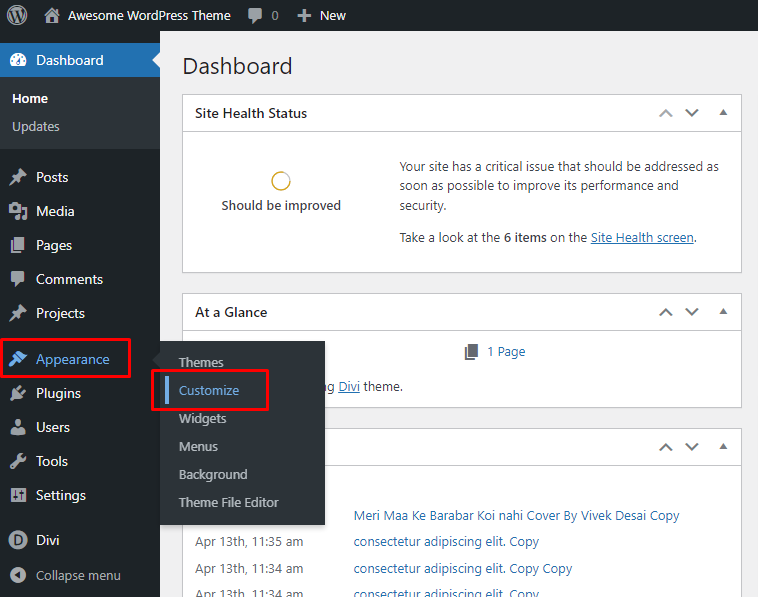
After going to Customize, you have to click on Header and Navigation. Just follow this instruction Dashboard > Appearance > Customize > Header & Navigation.
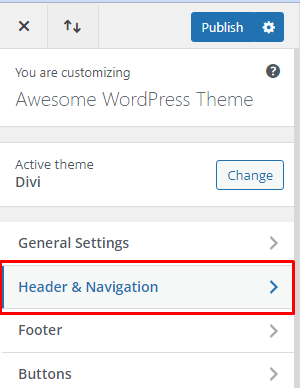
Primary Background Color Change
When you enter a website, there is a menu bar appearing on the top of the website, which is called the Primary navigation menu.
You can adjust the font size, style, and color in this menu option of your Primary Navigation Menu. This article will show you how to change the Primary Menu Background Color from the Dashboard. Please look at the direction below to find the location at the backend.
Dashboard > Appearance > Customize > Header & Navigation > Primary Menu Bar.

Now you can easily change the Primary Background Color from Dashboard > Appearance > Customize > Header & Navigation > Primary Menu Bar > Background Color. Here you can choose your desired background color.

Fixed Navigation Settings
The Fixed Navigation Bar is that Navigation when you scroll down your screen, a Menu Bar remains fixed to the top of the screen and shrinks to provide more readable space on the screen. Please follow the direction below to find the location at the backend.
Dashboard > Appearance > Customize > Header & Navigation > Fixed Navigation Settings.

To change the Fixed Navigation Background Color, please go to Dashboard > Appearance > Customize > Header & Navigation > Fixed Navigation Settings > Primary Menu Background Color and set the background color as you want.

If you have a color code of your choice, you can use it directly to put the color in the following box. Please look at the screenshot below:

I hope these tricks will help you understand Primary navigation and fix navigation background color issues without any questions. If you have any further questions, please feel free to share them with us in the comment section of this blog!
Related blog: How to Clear Cache in WordPress Website Easily
Subscribe WebExtent on Youtube
You can catch us on:
Facebook: https://facebook.com/webextent.net/
Twitter: https://twitter.com/WebExtent
Instagram: https://www.instagram.com/webextentofficial/
Regards.




[…] Suggested Blog: How to change Primary Navigation and Fixed Navigation Background Color in DIVI […]