

If you’ve spent any time building WordPress websites, you’ve probably faced this question: Gutenberg vs page builders, should you use the native Gutenberg block editor or invest in a dedicated page builder like Elementor, Divi, or Beaver Builder? It’s one of the most hotly debated topics in the WordPress community — and for good reason.
Both approaches have loyal fans, real-world use cases, and distinct trade-offs. The right choice depends on your goals, technical comfort level, and the type of site you’re building. In this guide, we break down the Gutenberg vs page builders debate from every angle so you can make an informed decision — and build a faster, better website.
What Is the Gutenberg Block Editor?
Gutenberg is WordPress’s native block-based editor, introduced in WordPress 5.0 in 2018 and improved substantially in every major release since. Rather than treating content as a single block of text (as the classic TinyMCE editor did), Gutenberg breaks everything into individual, reusable blocks — paragraphs, images, headings, buttons, galleries, and more.
With the arrival of Full Site Editing (FSE) in WordPress 5.9 and beyond, Gutenberg expanded beyond just post/page content. It now lets you build and edit your entire theme — headers, footers, templates, and global styles — without leaving the WordPress dashboard. This represents a fundamental shift in how WordPress themes and layouts are designed.
Key Features of Gutenberg
- Native WordPress integration with no third-party dependencies
- Full Site Editing (FSE) for theme-level control
- Reusable blocks and block patterns for consistent design
- Clean, semantic HTML output for better SEO performance
- Regular updates tied directly to WordPress core releases
- Block-based widgets replacing the classic widget system
What Are WordPress Page Builders?
WordPress page builders are third-party plugins that provide a visual, drag-and-drop interface for designing web pages. They sit on top of WordPress and give you pixel-level control over layouts and design without writing any code. The most popular options include Elementor, Divi (by Elegant Themes), Beaver Builder, Bricks Builder, and WPBakery.
Page builders became enormously popular in the era before Gutenberg because they filled a genuine gap: WordPress’s classic editor was never designed for complex page layouts. Designers and agencies flocked to tools like Elementor because they allowed full creative control — multi-column layouts, custom fonts, animations, and responsive design settings — all through a visual interface.
Key Features of Page Builders
- Drag-and-drop visual editor with real-time preview
- Extensive widget/element libraries (sliders, carousels, forms, popups)
- Pre-built full-page and section templates
- Advanced responsive breakpoint controls
- Built-in animation and scroll effects
- WooCommerce builder modules for e-commerce
- Global styling controls for site-wide design consistency
Gutenberg vs Page Builders: Head-to-Head Comparison
1. Performance and Page Speed
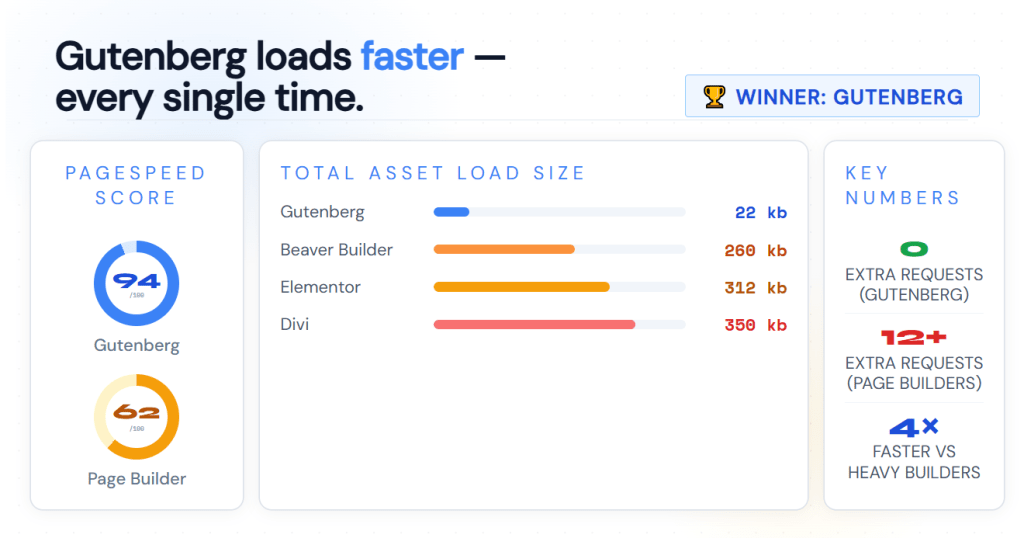
This is where Gutenberg has a clear advantage. Because it’s built into WordPress core, it adds zero extra HTTP requests, avoids loading third-party scripts, and produces leaner HTML output. Sites built with Gutenberg consistently score higher on Google PageSpeed Insights and Core Web Vitals benchmarks — metrics that directly impact search rankings.
Page builders, particularly Elementor and Divi, are known for loading heavier assets. Each page typically loads the builder’s JavaScript and CSS files, even when those features aren’t actively used. Some builders have worked hard to address this with asset loading optimizations, but the performance gap remains a legitimate concern — especially for mobile users and Core Web Vitals compliance.
Winner: Gutenberg
2. Design Flexibility and Creative Control
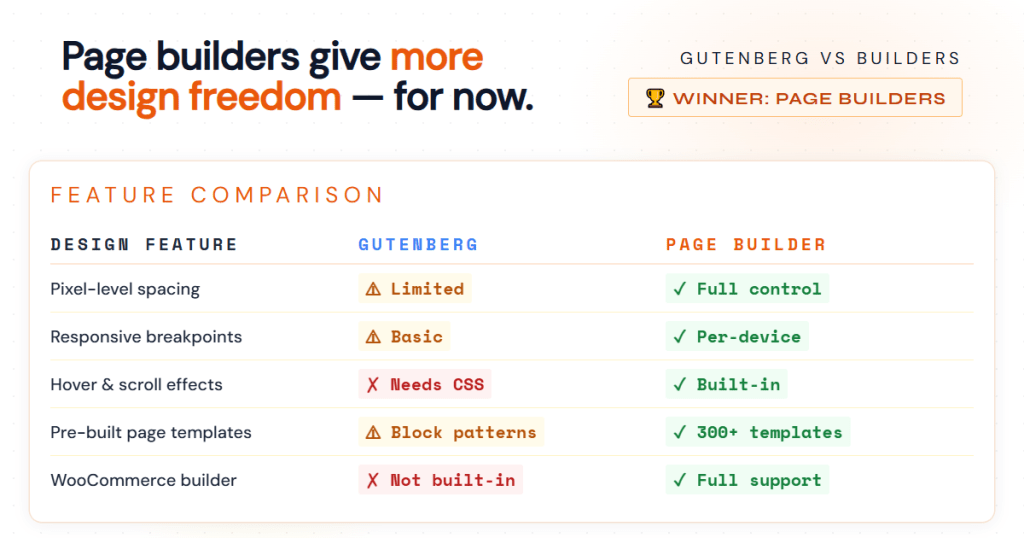
Here, page builders still hold the edge for complex, highly custom designs. Elementor’s visual editor lets you adjust margins, padding, typography, hover effects, and responsive behaviour for every single element — independently. Divi’s visual builder goes even further with global colour systems and design presets.
Gutenberg has made huge strides with Block Patterns, the Style Book, and Full Site Editing. However, for designers who want complete layout freedom without touching CSS, page builders still offer a more polished drag-and-drop experience. Creating complex hero sections, layered designs, or multi-column landing pages is simply faster in a mature page builder.
Winner: Page Builders (for now)
3. SEO and Code Quality
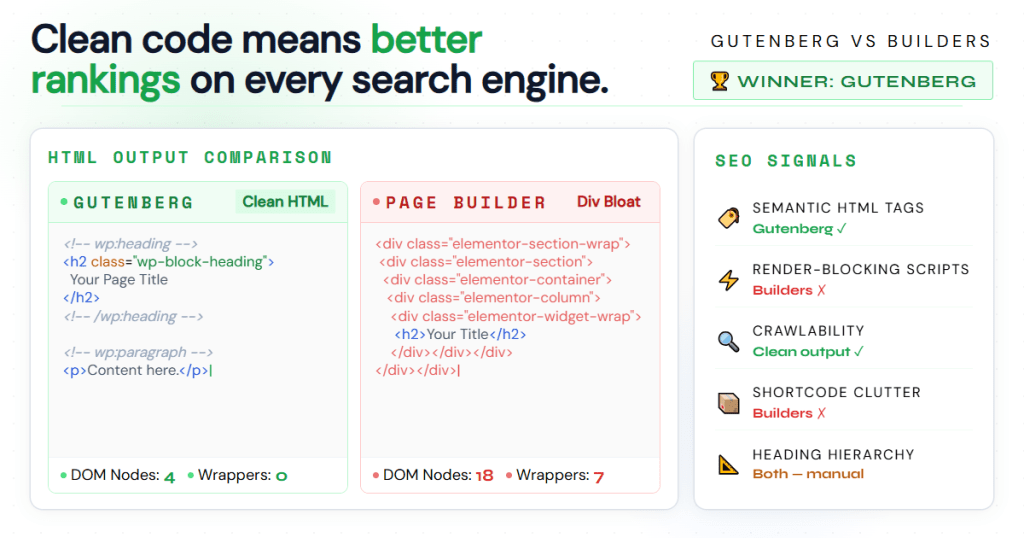
Gutenberg produces clean, standards-compliant HTML that search engine crawlers love. There’s no proprietary shortcode markup, no wrapper div bloat, and no render-blocking scripts. This cleaner output makes it easier to implement proper heading hierarchies, structured data, and semantic markup — all critical for on-page SEO.
Many page builders have historically generated bloated code with excessive div nesting. While modern builders like Bricks Builder and newer versions of Elementor have improved significantly, Gutenberg’s native integration simply results in tighter, more crawlable code. If technical SEO is a priority — and it should be — Gutenberg is the safer bet.
Winner: Gutenberg
4. Ease of Use and Learning Curve
For beginners, modern page builders often feel more intuitive because of their real-time visual feedback. Clicking on an element and editing it right there on screen is a natural UX that many non-developers quickly grasp. Elementor, in particular, has invested heavily in onboarding, tutorials, and a massive library of beginner-friendly templates.
Gutenberg’s interface is clean but different. Its sidebar-based editing model and the way it handles nested blocks can confuse new users who expect a more visual experience. That said, as Gutenberg matures and more block themes become available, the learning curve is shrinking quickly.
Winner: Page Builders (slight edge for beginners)
5. Cost and Licensing

Gutenberg is free — always. It’s part of WordPress core and receives ongoing development funded by Automattic and the wider WordPress community. You’ll never pay a subscription fee to use it, and there’s no premium tier required to unlock essential features.
Page builders range from free to premium. Elementor Pro runs $59–$399/year depending on the license tier. Divi requires an Elegant Themes membership at $89/year. For agencies managing multiple client sites, these costs add up quickly.
Winner: Gutenberg
6. Long-Term Compatibility and Lock-In Risk
One of the most underappreciated factors in this debate is lock-in risk. Page builders store layout data in proprietary formats. If you decide to switch from Elementor to another tool — or deactivate it — your carefully designed pages can turn into a mess of unrendered shortcodes or stripped-down text. Migrating away from a page builder is often painful and expensive.
Gutenberg’s content is stored as standard HTML with block comments in the WordPress database. It’s portable, readable, and compatible with any future WordPress-based tool. For clients who may want to change themes or development teams down the line, this interoperability is a meaningful advantage.
Winner: Gutenberg
When Should You Choose Gutenberg?
- Gutenberg is the right choice when you:
- Are building a blog, news site, or content-heavy publication
- Want the best possible Core Web Vitals and SEO performance
- Prefer to keep plugin dependencies minimal
- Are starting a new site and want to future-proof your build
- Use a modern block theme like Kadence, GeneratePress, or Twenty Twenty-Four
- Have basic-to-intermediate design needs that don’t require pixel-perfect custom layouts
When Should You Choose a Page Builder?
A page builder makes more sense when you:
- Need to build highly custom landing pages or marketing funnels
- Are working with clients who need to edit their site without any coding knowledge
- Require advanced WooCommerce customisation with visual product and checkout builders
- Need complex popup, form, or dynamic content features baked into one tool
- Are part of an agency with existing Elementor or Divi workflows and templates
- Have a design-heavy project with unique layouts that exceed Gutenberg’s current capabilities
Can You Use Gutenberg and a Page Builder Together?
Yes — and many WordPress developers do exactly this. A common hybrid approach is to use a lightweight block theme as your base and Gutenberg for posts and standard pages, while using a page builder only for specific high-design pages like homepages or sales funnels.
Tools like Spectra, Kadence Blocks, or GenerateBlocks extend Gutenberg’s native capabilities significantly — adding advanced layout blocks, global colour palettes, and design controls that close the gap with page builders without adding the same performance overhead. These block plugins are increasingly popular among developers who want design power without builder lock-in.
The Verdict: Which Is Better for Modern WordPress Sites?
For most modern WordPress sites — particularly new builds prioritising performance and SEO — Gutenberg is the better long-term foundation. WordPress is clearly investing its core development resources into the block editor, and the ecosystem of block themes and plugins is growing rapidly. Building on Gutenberg means building with the grain of WordPress’s future.
That said, page builders are not going away. For agencies building complex client sites, for marketers who need fast landing page production, and for WooCommerce stores requiring deep visual customisation, mature page builders like Elementor Pro or Bricks Builder remain powerful, practical tools.
The smartest approach in 2025 and beyond? Learn Gutenberg well. Understand its block ecosystem. And use a page builder only when the project genuinely demands it — not out of habit or because it’s what you’ve always done.
Conclusion
The Gutenberg vs page builders debate doesn’t have one universal answer — it has the right answer for your specific project. Gutenberg wins on performance, SEO, cost, and future-proofing. Page builders win on design flexibility, ease of use for beginners, and advanced feature sets for complex builds.
The good news? WordPress has never offered more capable tools on both sides of this debate. Whether you go all-in on blocks or leverage a page builder for select use cases, the most important thing is choosing the tool that matches your site’s goals, your team’s workflow, and your visitors’ need for a fast, well-structured experience.


Leave a Reply