

Choosing the right eCommerce platform is one of the most important decisions you’ll make as an online business owner. Two names dominate the conversation: WooCommerce and Shopify. Both are powerful, widely used, and capable of helping you build a thriving online store — but they serve very different types of sellers.
So which one is actually better for your online store? The answer depends on your goals, technical comfort level, and budget. This guide breaks down everything you need to know to make the right choice.
What Is WooCommerce?
WooCommerce is a free, open-source eCommerce plugin built for WordPress. It transforms any WordPress website into a fully functional online store. Because it runs on WordPress, it gives you complete ownership and control over your store’s data, design, and functionality.
WooCommerce powers over 28% of all online stores globally, making it the most widely used eCommerce solution in the world. It’s especially popular among bloggers, content-driven businesses, and developers who want maximum flexibility.
What Is Shopify?
Shopify is a dedicated, all-in-one eCommerce platform. Unlike WooCommerce, it’s a hosted solution — meaning Shopify takes care of your hosting, security, and software updates for you. You simply sign up, choose a theme, and start selling.
Shopify currently powers over 4.6 million online stores worldwide. It’s known for its ease of use, clean interface, and reliable performance out of the box.
WooCommerce vs. Shopify: Head-to-Head Comparison
Ease of Use
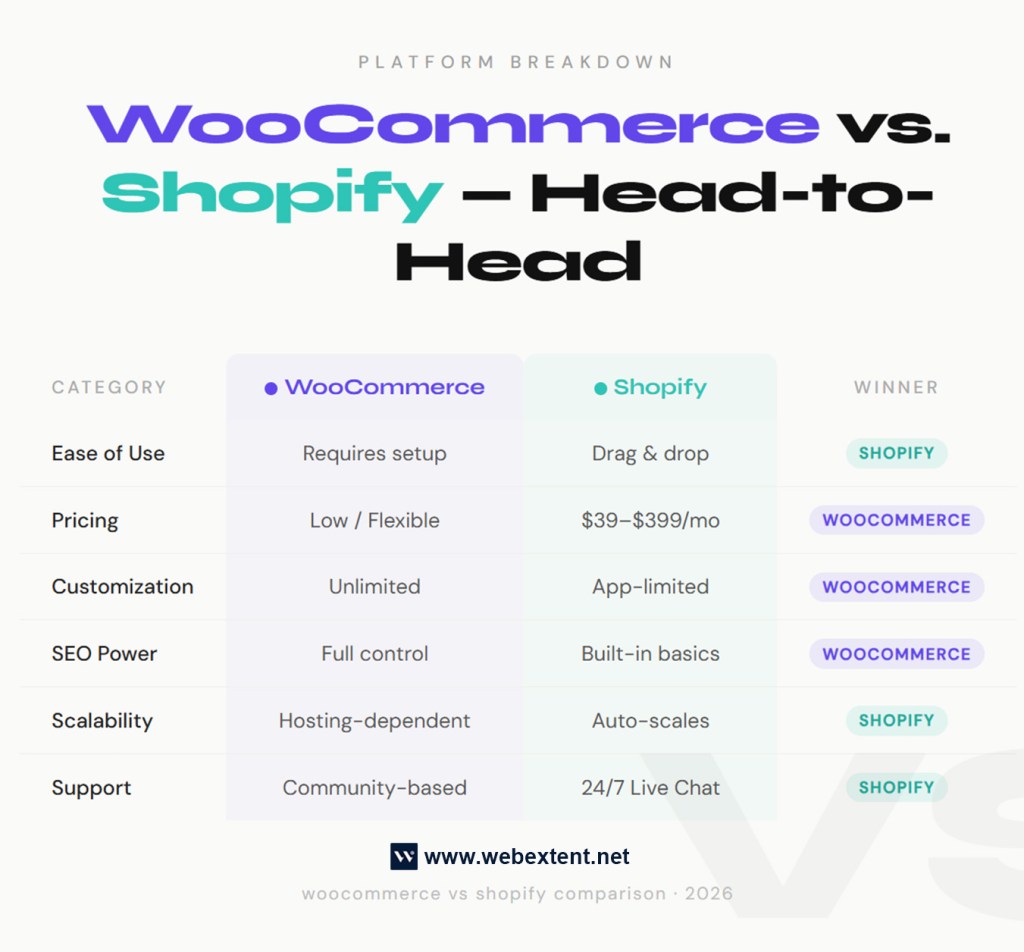
Shopify wins here. If you’ve never built a website before, Shopify’s drag-and-drop interface makes it incredibly easy to launch a store in hours. Everything is managed from one dashboard — products, orders, payments, and shipping.
WooCommerce has a steeper learning curve. You’ll need to install WordPress first, set up hosting, install the WooCommerce plugin, and configure settings. It’s not difficult for someone with basic technical knowledge, but it’s less beginner-friendly than Shopify.
Bottom line: Shopify is better for non-technical users. WooCommerce is better for those comfortable with WordPress.
Pricing and Cost
This is where things get more nuanced.
WooCommerce is free to install, but you’ll pay for:
- Web hosting ($5–$30/month depending on provider)
- A premium theme ($0–$100 one-time)
- Premium plugins for added features
- An SSL certificate (often free with hosting)
Shopify charges a monthly subscription:
- Basic plan: $39/month
- Shopify plan: $105/month
- Advanced plan: $399/month
Shopify also charges transaction fees (0.5%–2%) unless you use Shopify Payments.
For tight budgets, WooCommerce can be more affordable in the long run — especially if you’re comfortable managing your own hosting. For sellers who want predictable monthly costs and no technical overhead, Shopify’s pricing is straightforward.
Customization and Flexibility
WooCommerce is the clear winner here. Because it’s open-source and built on WordPress, the customization potential is virtually unlimited. You can modify every line of code, install thousands of plugins, and build exactly the store you envision.
Shopify also offers customization through its theme editor and app store, but you’re ultimately working within Shopify’s ecosystem. Deep customization often requires knowledge of Shopify’s own Liquid coding language.
If you want a unique, custom-built store with full design freedom, WooCommerce is the better choice.
eCommerce Features
Both platforms offer strong core features:
- Product management
- Inventory tracking
- Discount codes and coupons
- Multiple payment gateways
- Tax and shipping calculations
- Mobile-optimized storefronts
Shopify has a slight edge in built-in features right out of the box. Things like abandoned cart recovery, multichannel selling (Facebook, Instagram, Amazon), and real-time shipping rates are available without needing extra plugins.
WooCommerce relies more heavily on plugins to match these features. The good news is that most plugins are free or low-cost, and the WooCommerce plugin ecosystem is enormous.
SEO Capabilities
WooCommerce (with WordPress) wins for SEO. WordPress is widely considered the gold standard for content marketing and SEO. Pair WooCommerce with an SEO plugin like Yoast or Rank Math, and you have an incredibly powerful setup for ranking your product pages and blog content in search engines.
You get full control over URLs, meta tags, schema markup, site speed optimization, and content structure — all critical factors for strong search engine performance.
Shopify does have solid built-in SEO features — clean URLs, automatic sitemaps, and customizable meta fields — but it has limitations. For example, Shopify forces a /collections/ and /products/ URL structure that can’t be changed, which some SEO professionals find restrictive.
If organic search traffic is a core part of your growth strategy, WooCommerce gives you more tools to compete.
Payment Gateways
Both platforms support all major payment gateways including PayPal, Stripe, and direct bank transfers.
Shopify has its own native payment solution — Shopify Payments — which eliminates transaction fees and simplifies checkout. However, it’s not available in all countries.
WooCommerce supports a wide range of payment gateway plugins, giving you more options depending on your region and audience.
Scalability
Both platforms can handle stores of all sizes — from a five-product boutique to an enterprise-level catalog with thousands of SKUs.
Shopify scales more effortlessly because the hosting infrastructure scales with your store automatically. During high-traffic events like Black Friday, you don’t need to worry about your server crashing.
WooCommerce can scale just as well, but it requires you to invest in better hosting as your store grows. A high-traffic WooCommerce store needs managed WordPress hosting or a dedicated server to maintain performance.
Support
Shopify offers 24/7 customer support via live chat, email, and phone — a major advantage for business owners who need fast help.
WooCommerce doesn’t offer direct customer support in the same way. You’ll rely on community forums, documentation, and the support teams of individual plugin developers. That said, the WooCommerce community is massive and incredibly active.
Who Should Use WooCommerce?
WooCommerce is the right choice if you:
- Already use WordPress or plan to build a content-rich site alongside your store
- Want full control over your data, hosting, and design
- Are comfortable managing a website or have a developer on hand
- Need advanced SEO capabilities
- Want to minimize monthly platform costs
- Are building a niche or highly customized store
Who Should Use Shopify?
Shopify is the right choice if you:
- Want to launch quickly without technical setup
- Prefer a fully managed, all-in-one solution
- Need reliable 24/7 customer support
- Plan to sell across multiple channels (social media, marketplaces)
- Are a non-technical entrepreneur focused purely on sales
- Want predictable monthly pricing
Final Verdict: WooCommerce vs. Shopify
There’s no universal winner — the best platform is the one that aligns with your specific business needs.
Choose WooCommerce if you value flexibility, SEO power, and cost control. It’s the better long-term platform for content-driven businesses and developers who want to build something truly custom.
Choose Shopify if you value simplicity, speed-to-launch, and hands-off maintenance. It’s the better platform for entrepreneurs who want to focus on selling rather than managing a website.
Both platforms have helped millions of businesses succeed online. The key is knowing which one fits your workflow, technical ability, and growth strategy. If you’re still unsure, consider exploring beginner guides to setting up an online store or comparing eCommerce hosting options before making your final decision.
Ready to build your online store? Whether you choose WooCommerce or Shopify, the best time to start is today. Pick your platform and take the first step toward your eCommerce success. 👉 Start Your Free Shopify Trial or ⚡ Install WooCommerce Free. Contact Us for any assistance to build your online store.
👉 Which platform did you go with — WooCommerce or Shopify? Drop your experience in the comments below. We’d love to hear what’s working for you.


Leave a Reply