
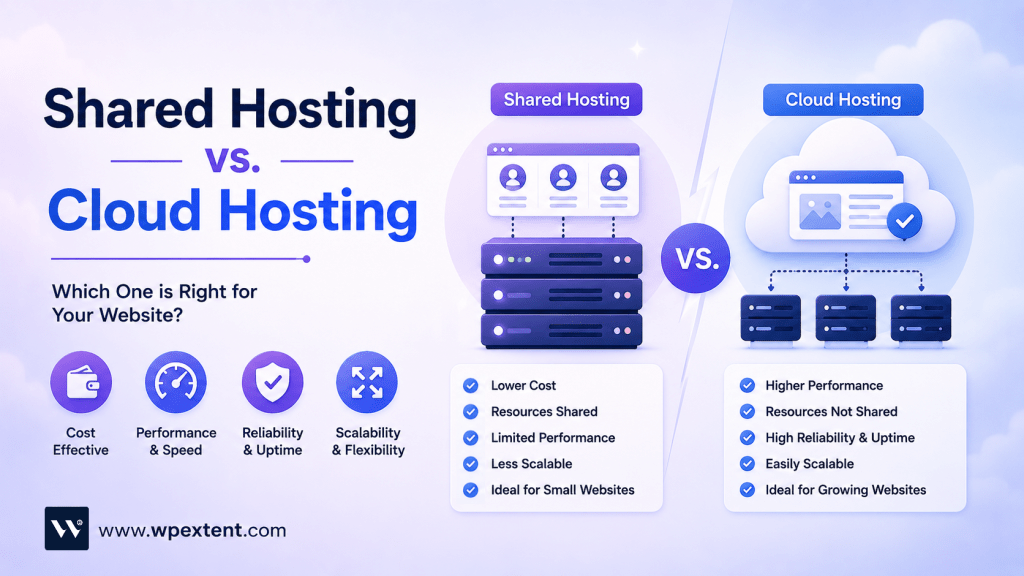
The shared hosting vs. cloud hosting decision is one of the first big choices every website owner has to make — and getting it wrong is one of the most expensive mistakes you can make online. Slow load times, frequent downtime, and surprise migration costs can quietly kill traffic before your site ever gets a real chance to grow.
Both options are sold by almost every hosting company on the planet, often at similar starting prices, so they sound interchangeable. But under the hood, shared and cloud hosting work in completely different ways — and that difference can make or break your website’s performance, security, and growth.
In this in-depth guide, you’ll learn exactly how shared hosting and cloud hosting compare across every factor that actually matters: speed, uptime, price, scalability, security, and ease of use. By the end, you’ll know precisely which one fits your goals, budget, and traffic level — without the marketing fluff.
What Is Shared Hosting? A Quick, Honest Explanation
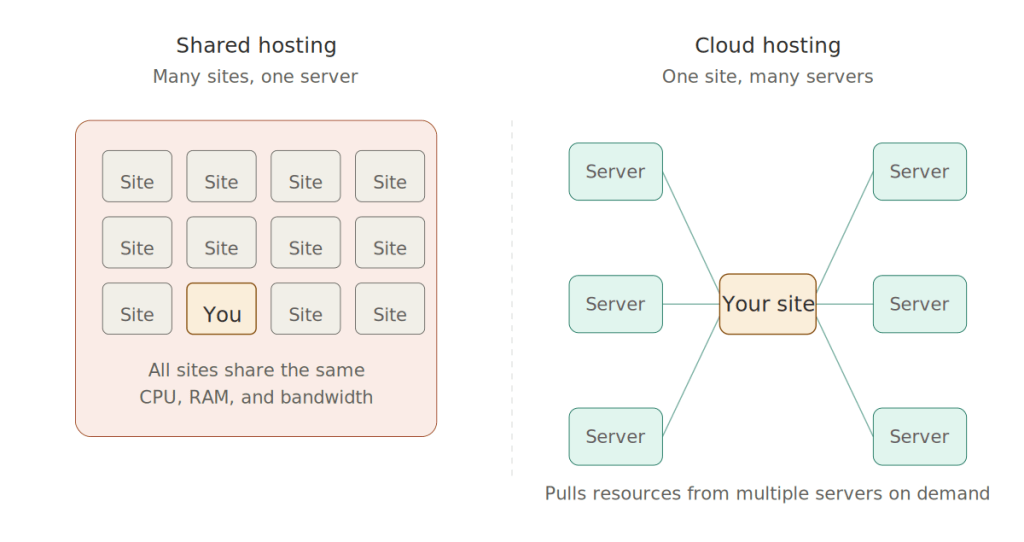
Shared hosting is the most affordable type of web hosting, where many websites — sometimes hundreds or even thousands — live on the same physical server and share its resources.
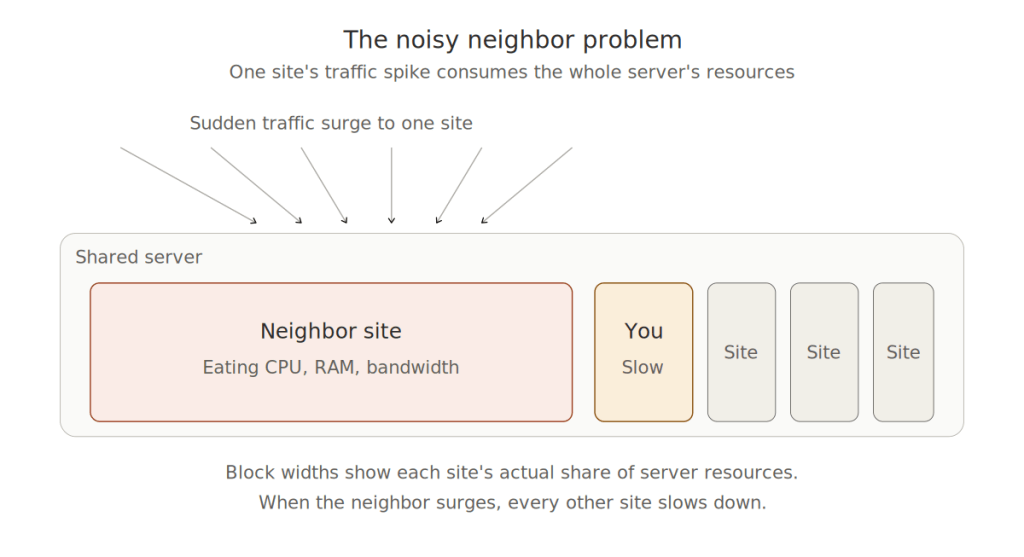
Think of it like renting a room in a large apartment building. Everyone shares the same plumbing, electricity, and Wi-Fi. It’s cheap because the landlord splits the cost across everyone, but if your neighbor throws a wild party, your peaceful evening is over.
In hosting terms, that “party” might be a sudden traffic spike on another website that slows down every other site on the server.
How Shared Hosting Works
A single server (usually a high-powered machine in a data center) is divided up among many users. Each user gets a slice of the CPU, RAM, storage, and bandwidth. The hosting provider handles all the technical setup, server maintenance, security patches, and software updates.
Pros of Shared Hosting
- Extremely affordable — often $2 to $10 per month
- Beginner-friendly — comes with cPanel, one-click WordPress installs, and easy email setup
- Zero server management — the provider handles everything technical
- Free extras — most plans include a free domain, SSL certificate, and email accounts
- Perfect for static or low-traffic sites — works great for blogs, portfolios, and brochure websites
Cons of Shared Hosting
- Limited resources — you only get a small slice of the server
- The “bad neighbor” effect — another site’s traffic surge can slow yours down
- Poor scalability — if your site grows, you’ll need to migrate to a bigger plan
- Performance ceiling — fine for small sites, but it struggles with traffic spikes
- Security is shared — if one site on the server is compromised, the risk can spread
- Less control — no root access, limited custom software, restricted server settings
What Is Cloud Hosting? The Modern Alternative
Cloud hosting is a newer, smarter approach where your website is hosted across a network of interconnected virtual servers instead of just one physical machine. The “cloud” is essentially a giant pool of computing resources — CPU, RAM, and storage — that your site can pull from on demand.
If shared hosting is renting a room in an apartment, cloud hosting is more like staying at a luxury hotel chain. If one hotel is full or has an issue, you instantly get moved to another location without even noticing.
How Cloud Hosting Works
Your website’s files and data are spread (or replicated) across multiple servers in different locations. When someone visits your site, the cloud system automatically routes the request to the server that can deliver the fastest response. If one server fails, another immediately takes over — meaning your site stays online even during hardware issues.
Pros of Cloud Hosting
- High uptime — usually 99.99% or better, thanks to failover servers
- Instant scalability — add more resources during traffic spikes without migrating
- Pay-as-you-go pricing — many providers charge only for what you actually use
- Better speed — dedicated resources and global server networks reduce loading times
- Improved security — isolated environments reduce cross-site risks
- Excellent for growing businesses — handles unpredictable or rapidly increasing traffic
- Redundancy built-in — your data is backed up across multiple servers automatically

Cons of Cloud Hosting
- More expensive than shared hosting — entry-level plans usually start around $10 to $30 per month
- Pricing can be unpredictable — pay-as-you-go can lead to surprise bills during traffic spikes
- Steeper learning curve — some plans require more technical know-how (though managed options exist)
- Variable performance — performance can vary slightly depending on the provider’s infrastructure quality
Shared Hosting vs. Cloud Hosting: The Complete Side-by-Side Comparison
Here’s where the rubber meets the road. Let’s compare both options across the factors that genuinely affect your website’s success.
1. Performance and Speed
Shared Hosting: Performance depends heavily on what other sites on your server are doing. On a quiet day, a shared site can load reasonably fast. But during peak traffic hours — or if a neighboring site goes viral — your site might crawl. Average load times typically range from 1.5 to 4 seconds.
Cloud Hosting: Far more consistent. Because resources are pulled from a pool and traffic can be routed to the least-loaded server, performance stays stable even during sudden spikes. Average load times are typically under 1.5 seconds, and many cloud providers include built-in CDNs and caching.
Winner: Cloud hosting, by a wide margin.
2. Pricing
Shared Hosting: Wins on raw price. Plans usually start between $2 and $10 per month, with introductory discounts pulling first-year costs even lower. Renewal prices are typically 2 to 3 times higher.
Cloud Hosting: More expensive upfront, but the value scales with your traffic. Entry-level managed cloud plans start around $10 to $30 per month. Pay-as-you-go cloud platforms (like DigitalOcean, Vultr, or AWS Lightsail) can be as low as $5 to $7 per month for a small VPS-style instance, though you’ll need more technical skill to manage them.
Winner: Shared hosting for raw affordability; cloud hosting for long-term value.
3. Scalability
Shared Hosting: Scalability is its biggest weakness. If your site outgrows the plan, you can’t just “add more power” — you have to migrate to a bigger plan or a different host entirely. That means downtime, DNS changes, and headaches.
Cloud Hosting: Built for scaling. You can add more CPU, RAM, or bandwidth in minutes — sometimes automatically — without migrating anything. This is huge for e-commerce stores, viral content, or seasonal businesses.
Winner: Cloud hosting, hands down.
4. Uptime and Reliability
Shared Hosting: Most providers promise 99.9% uptime, but real-world reliability depends on the server’s health and how busy it gets. A single hardware failure can take down hundreds of sites at once.
Cloud Hosting: Promises 99.99% or higher uptime because if one server fails, another automatically picks up. There’s no single point of failure.
Winner: Cloud hosting.
5. Security
Shared Hosting: You share the server with strangers, which means you also share risks. A vulnerability on another site can — in rare cases — affect yours. Most providers add malware scanning, firewalls, and free SSL, but you have no control over the environment.
Cloud Hosting: Each cloud instance is typically isolated. You get more control over firewall rules, security patches, and custom configurations. Many cloud platforms also include DDoS protection, automated backups, and enterprise-grade encryption by default.
Winner: Cloud hosting.
6. Ease of Use
Shared Hosting: Designed for beginners. You sign up, click a button, install WordPress, and you’re online. No technical knowledge required.
Cloud Hosting: Varies. Managed cloud hosts (like Cloudways, Kinsta, or SiteGround Cloud) are nearly as easy as shared hosting. Unmanaged cloud platforms (like raw AWS or Google Cloud) require Linux knowledge, command-line skills, and server configuration know-how.
Winner: Shared hosting for absolute beginners; managed cloud hosting is a close second.
7. Customer Support
Shared Hosting: Most providers offer 24/7 live chat, ticket, and phone support. Quality varies, but support is built around helping non-technical users.
Cloud Hosting: Managed cloud hosts often offer more advanced, performance-focused support — including site speed audits, migration help, and developer-level troubleshooting.
Winner: Tie, depending on the provider.
8. Backup and Data Protection
Shared Hosting: Backups are usually included but limited (weekly or daily, with restoration sometimes available only as a paid add-on).
Cloud Hosting: Automatic, redundant backups across multiple servers. Many providers include on-demand snapshots, point-in-time restores, and even free off-site backups.
Winner: Cloud hosting.
Quick Comparison Table
| Feature | Shared Hosting | Cloud Hosting |
|---|---|---|
| Starting Price | $2 – $10/month | $10 – $30/month |
| Performance | Variable | Consistently fast |
| Uptime | 99.9% (typical) | 99.99%+ |
| Scalability | Poor (requires migration) | Instant and automatic |
| Security | Shared (basic) | Isolated (advanced) |
| Best for Traffic | Up to ~10,000 monthly visits | 10,000 to millions |
| Ease of Use | Very easy | Easy (managed) / Hard (unmanaged) |
| Resource Allocation | Fixed slice of one server | Flexible pool from many servers |
| Ideal Users | Beginners, hobby sites | Businesses, growing sites |

When Should You Choose Shared Hosting?
Shared hosting is the smart choice if:
- You’re launching your first website and just want to get online quickly
- You’re running a personal blog, portfolio, or resume site
- Your site receives fewer than 10,000 monthly visitors
- You have a tight budget and need to keep costs to a few dollars a month
- You don’t need advanced features like custom server software or root access
- You want maximum simplicity with cPanel and one-click installs
- You’re building a small local business website that mostly serves as an online brochure
Don’t overpay for power you’ll never use. For most new websites, shared hosting is the perfect starting point.
When Should You Choose Cloud Hosting?
Cloud hosting is the better investment if:
- You run an online store, especially with more than 100 products
- Your traffic is growing fast or fluctuates seasonally
- You’re running a WooCommerce, Shopify Plus, or Magento site
- You publish content that occasionally goes viral
- You need strong uptime guarantees for revenue-critical applications
- You run SaaS platforms, membership sites, or learning management systems
- You handle sensitive customer data that requires advanced security
- You want room to scale globally without changing hosts later
If your website earns money — or is on track to — cloud hosting almost always pays for itself.
Real-World Scenarios: Which Hosting Wins?
Scenario 1: A freelance graphic designer’s portfolio A 10-page portfolio with light traffic and a contact form. Shared hosting is perfect — cheap, simple, and more than enough power.
Scenario 2: A WooCommerce store with 200 products Even moderate traffic can choke shared hosting once carts and checkout sessions stack up. Cloud hosting is the right choice for reliability and speed during sales.
Scenario 3: A fast-growing news or content website Traffic spikes are unpredictable. A single viral post can crash a shared site for hours. Cloud hosting handles spikes without breaking a sweat.
Scenario 4: A nonprofit with a simple informational website Static content, predictable traffic, limited budget. Shared hosting is the smart, frugal choice.
Scenario 5: A startup launching a SaaS product Performance, uptime, scalability, and security all matter. Cloud hosting (especially managed) is non-negotiable.
Hidden Costs Most Comparison Articles Don’t Mention
Here are a few things you’ll rarely see discussed in other shared hosting vs. cloud hosting comparisons:
- Shared hosting renewal pricing. Many providers offer huge first-year discounts, then raise prices 200% to 300% at renewal. Always check the renewal rate, not just the intro rate.
- Cloud hosting bandwidth charges. Some cloud providers (especially AWS, GCP, and Azure) charge for outbound bandwidth. A viral month could mean a surprise bill.
- Migration costs. Moving from shared to cloud is much easier when your host offers free migration — many do, but not all.
- Backup fees. “Free backups” sometimes means daily, but restoring from them might cost extra.
- Email hosting. Cloud hosts often don’t include email hosting, while shared hosts almost always do. Add $5–$10/month for email if cloud is your pick.
How to Migrate from Shared Hosting to Cloud Hosting
If you’ve outgrown shared hosting, here’s the simplified roadmap:
- Choose a managed cloud provider with free migration (Cloudways, Kinsta, WP Engine, SiteGround Cloud, and DreamHost are popular choices).
- Back up everything — your files, database, and emails — before you start.
- Request a free migration from your new host, or use a plugin like Duplicator or All-in-One WP Migration.
- Test the new site on a temporary URL before updating DNS.
- Update your domain’s DNS records to point to the new cloud host.
- Monitor performance for 48 hours before canceling your old shared plan.
A typical migration takes a few hours if your site is small — sometimes longer for large stores or databases.
Frequently Asked Questions
Is cloud hosting always better than shared hosting? No. Cloud hosting is better for performance, scalability, and reliability, but shared hosting is better for absolute simplicity and the lowest possible cost. The “best” option depends entirely on your site’s size, traffic, and goals.
Can I start with shared hosting and switch to cloud later? Absolutely. In fact, this is one of the most common upgrade paths. Just make sure your new host offers free or low-cost migration support.
Is cloud hosting safer than shared hosting? Generally, yes. Cloud environments are isolated, often include enterprise-level firewalls, DDoS protection, and automatic backups. Shared hosting depends entirely on the provider’s security setup.
Does cloud hosting load faster than shared hosting? In nearly all real-world tests, yes. Cloud hosting typically delivers faster load times, lower TTFB (time to first byte), and better Core Web Vitals scores — all of which help SEO.
Will Google rank cloud-hosted sites higher? Google doesn’t rank based on hosting type, but it does reward fast, reliable websites. Since cloud hosting tends to load faster and stay online longer, it can indirectly improve your rankings.
Can I use cloud hosting for WordPress? Yes — and it’s one of the most popular use cases. Managed WordPress cloud hosts like Kinsta, Cloudways, and WP Engine are optimized specifically for WordPress speed and security.
Final Verdict: Which One Should You Pick?
If you’re just starting out, want the easiest setup, and have a small site that doesn’t need to handle big traffic — shared hosting is the smart, budget-friendly choice.
If your website is your business, earns revenue, or is growing fast — cloud hosting is the better long-term investment. The extra cost pays for itself in faster load times, better uptime, stronger security, and the ability to scale without migrations.
The good news? You don’t have to commit forever. Start where you are, and upgrade when your traffic, goals, or revenue demand it.
Ready to Pick the Right Hosting for Your Website?
Don’t let slow load times, downtime, or scaling headaches hold your website back. Whether you’re launching your first site or scaling a fast-growing business, the right hosting choice can change everything.
👉 Contact us for a free hosting consultation, and we'll help you choose the perfect plan based on your traffic, goals, and budget — no obligation, no jargon, just honest expert advice.


Leave a Reply