

Website speed is one of the most important factors for success in 2026. A slow-loading website can frustrate visitors, reduce conversions, and hurt your rankings on search engines like Google.
The good news is—you don’t need paid tools to check your website performance. You can easily test your website speed for free using a reliable tool provided by Google.
In this guide, you’ll learn how to check your website speed step by step using a free tool, understand the results, and improve your performance.
Why Website Speed Matters
Before testing your website, it’s important to understand why speed is critical.
A fast website helps you:
- Improve user experience
- Increase engagement and conversions
- Rank higher on Google
- Reduce bounce rate
- Build trust with visitors
On the other hand, a slow website can drive users away within seconds.
Best Free Tool to Test Website Speed
One of the most accurate and trusted tools is:
This tool is powered by Google and provides detailed insights into your website performance.
With this tool, you can check:
- Performance score
- Mobile and desktop speed
- Core Web Vitals
- Suggestions for improvement
How to Test Your Website Speed (Step-by-Step)
Follow these simple steps:
Step 1: Open the Tool
Go to:
👉 https://pagespeed.web.dev/
Step 2: Enter Your Website URL
Copy your website link and paste it into the input field.
Step 3: Click Analyze
Click the Analyze button and wait a few seconds.
Step 4: View Your Results
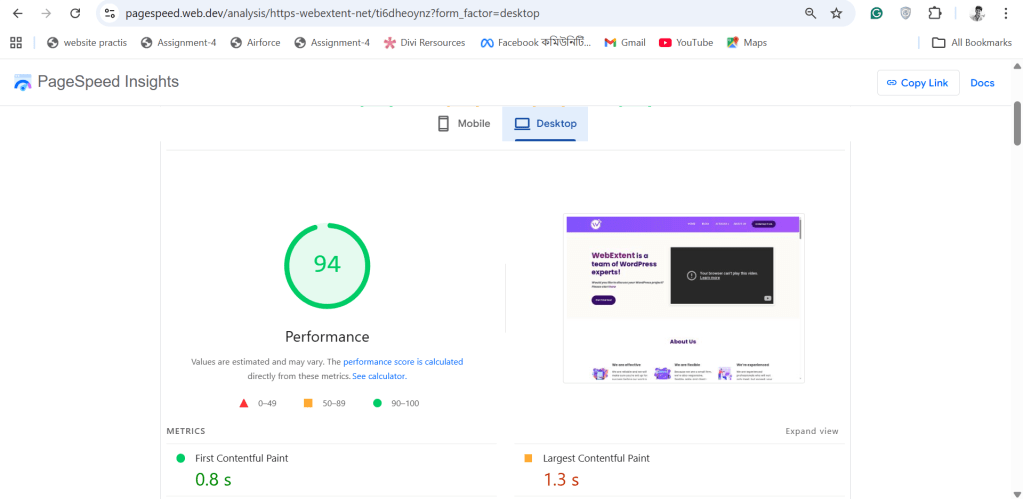
Once the test is complete, you will see your performance score and detailed report.
Understanding Your Performance Score
Your website will receive a score between 0 and 100.
- 90–100 → Excellent
- 70–89 → Good
- 50–69 → Needs Improvement
- Below 50 → Poor
Try to aim for a score above 90 for the best performance.
Key Metrics You Should Know
PageSpeed Insights shows important performance metrics.
Largest Contentful Paint (LCP)
Measures how fast the main content loads.
👉 Ideal: Under 2.5 seconds
First Input Delay (FID)
Measures how quickly users can interact.
👉 Lower is better
Cumulative Layout Shift (CLS)
Measures visual stability.
👉 Should be close to 0
These are known as Core Web Vitals, which directly impact SEO.
Common Issues That Slow Down Your Website
If your score is low, it’s usually due to:
- Large, unoptimized images
- Too many plugins
- Slow hosting
- Unused JavaScript or CSS
- No caching system
Identifying these issues is the first step to fixing them.
How to Improve Your Website Speed
Here are some quick improvements you can apply:
Optimize Images
- Compress images before uploading
- Use modern formats like WebP
Use Caching
Caching helps your website load faster by storing data.
Choose Better Hosting
A fast hosting provider can significantly improve speed.
Reduce Plugins
Remove unnecessary plugins to avoid extra load.
Minimize Code
Reduce unused CSS and JavaScript files.
Mobile vs Desktop Performance
Always check both mobile and desktop results.
Why?
- Most users visit from mobile devices
- Google uses mobile-first indexing
Improving mobile speed should be your priority.
How Often Should You Test Your Website?
You should check your website speed:
- After major updates
- When adding plugins
- At least once a month
Regular testing helps maintain performance.
Need Help Optimizing Your Website?
Improving website speed can sometimes require technical expertise.
At WebExtent, we help businesses:
- Optimize website performance
- Improve SEO rankings
- Generate leads
- Design high-converting websites
- Provide complete digital solutions
👉 Visit: https://wpextent.com/
We ensure your website is fast, optimized, and ready to grow your business.
Conclusion
Testing your website speed is simple, free, and extremely important.
With tools like PageSpeed Insights, you can quickly identify performance issues and take action.
A fast website helps you:
- Rank higher on Google
- Improve user experience
- Increase conversions
Start testing your website today and make speed a priority for your online success.



Leave a Reply